

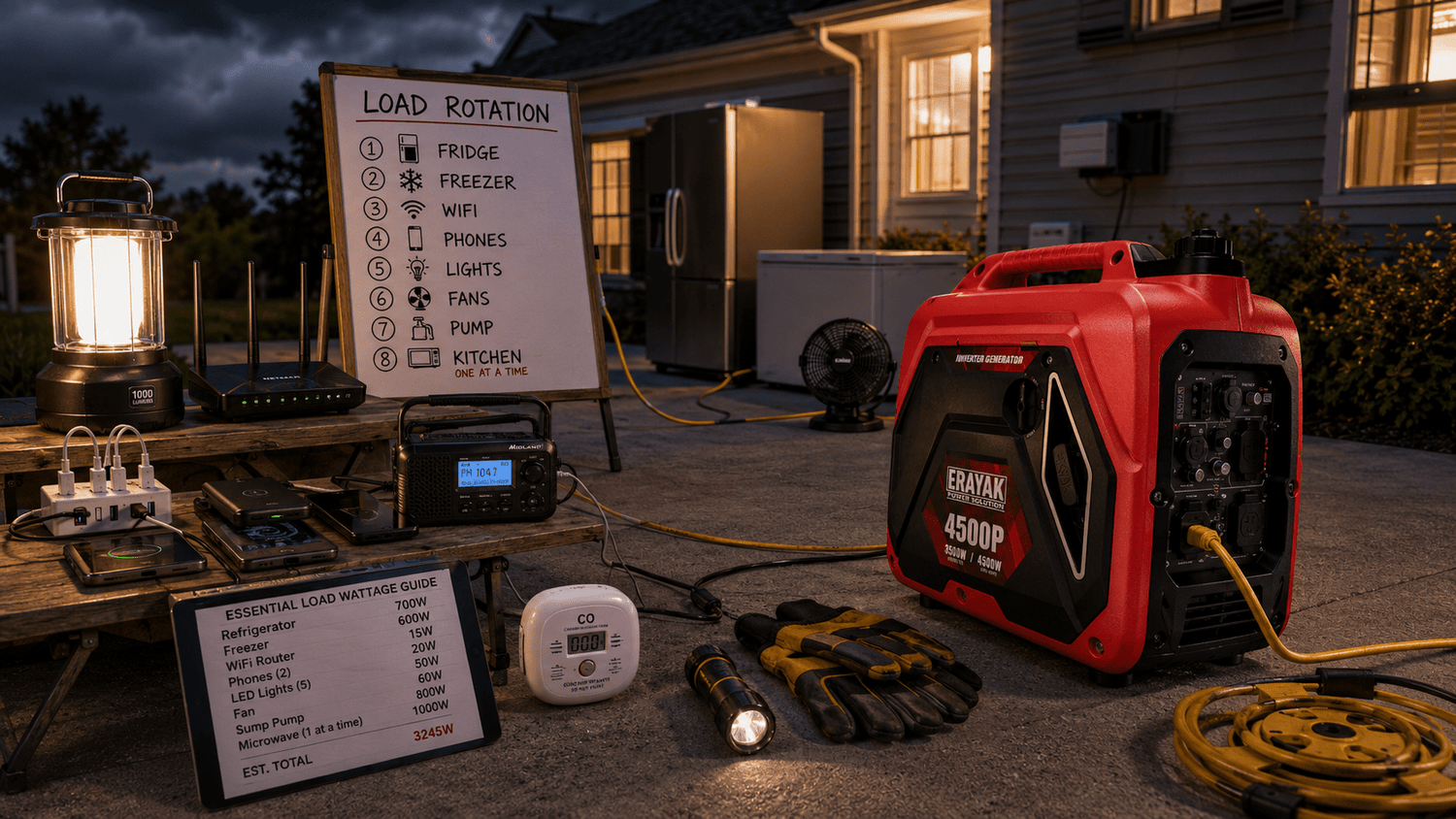
Home Backup Generator Sizing Guide: What Can It Run During an Outage?
Choosing the right home backup generator is not about buying the biggest number on the box. It is about knowing what you actually need during an outage, which appliances need extra startup power, which loads can run together, and which high-demand devices should be rotated. A good sizing plan helps you protect food, stay connected, keep lights on, run fans, power essential chargers, and avoid overload.
Quick Answer
A practical home backup generator sizing guide starts with your essential loads: refrigerator, freezer, phone charging, WiFi router, modem, LED lights, fans, emergency radio, medical device chargers, sump pump, and selected kitchen appliances. Add the running watts of the loads you want to use at the same time, then allow extra headroom for starting watts from refrigerators, freezers, pumps, compressors, and motor-driven appliances.
For compact essentials, a smaller portable inverter generator may be enough. For managed home backup with refrigerator, lights, WiFi, phones, fans, and kitchen appliance timing, a mid-range generator such as the Erayak 4500P is a strong starting point. For larger loads, 30A planning, RV overlap, pumps, and selected 120V/240V planning, the Erayak 6800 series provides more headroom.
Why Generator Sizing Matters During an Outage
During an outage, your generator becomes a temporary power source for selected loads. If it is too small for your priority appliances, it may overload, trip protection, stall, or fail to start motor loads. If it is too large for your actual needs, it may cost more, use more fuel, and be harder to move or store.
Power What Matters First
Refrigerator, freezer, phones, WiFi, lights, fans, medical chargers, and pump loads usually matter more than convenience appliances.
Leave Room for Startup Surge
Compressors and motors may need extra power for a few seconds before settling into normal running power.
Size Affects Runtime
A right-sized generator helps you manage fuel better during a multi-hour or multi-day outage.
Running Watts vs Starting Watts
The most important sizing concept is the difference between running watts and starting watts. Running watts are what an appliance uses after it is operating. Starting watts are the extra power needed when a motor, compressor, or pump starts.
| Watt Type | What It Means | Common Examples |
|---|---|---|
| Running watts | Power used while the appliance is operating normally | LED lights, router, fan, laptop, refrigerator after startup |
| Starting watts | Short burst of extra power needed when a motor or compressor starts | Refrigerator, freezer, sump pump, well pump, RV AC, power tools |
| Surge headroom | Extra generator margin reserved for startup demand and load changes | Important when multiple appliances may start around the same time |
| Load rotation | Running high-demand appliances in separate windows | Microwave, coffee maker, kettle, toaster, griddle, pump, freezer |
Essential Home Loads to Plan First
Before choosing generator size, list what you truly need during an outage. Most families do not need to run the entire house. They need to keep food cold, maintain communication, run lights and fans, charge essential devices, and power a few critical appliances.
| Load Category | Common Devices | Sizing Tip |
|---|---|---|
| Food protection | Refrigerator, freezer, deep freezer | Plan for compressor startup and avoid starting multiple compressors together |
| Communication | Phones, power banks, modem, WiFi router, laptop | Low-load and high-priority during outages |
| Lighting | LED lamps, lanterns, task lights | Use low-watt LED lighting to save generator capacity |
| Comfort | Fans, small air purifier, CPAP, selected chargers | Prioritize airflow, sleep, and health-related charging |
| Water protection | Sump pump, selected well pump, septic pump where applicable | Check starting watts and run separately from other startup-heavy loads |
| Kitchen timing | Coffee maker, microwave, kettle, toaster, small cooker | Use one high-watt appliance at a time |
Home Backup Generator Size Categories
Generator sizing is easier when you think in categories instead of trying to power every appliance. Use the table below as a planning framework, then compare your exact load list with generator output.
| Generator Category | Best For | Typical Outage Strategy |
|---|---|---|
| Compact essentials | Phones, lights, fans, router, laptop, radio, small electronics | Focus on communication, lighting, and basic comfort |
| Managed home backup | Refrigerator, freezer planning, lights, WiFi, fans, coffee maker timing, phones | Run essentials together and rotate heavy loads |
| Fuel-flexible backup | Longer outages, mixed home/outdoor use, gasoline and propane planning | Use fuel flexibility to support storm and emergency planning |
| Higher-headroom backup | More appliances, pumps, 30A planning, selected 120V/240V loads, RV overlap | Plan multiple zones and larger startup demands carefully |
Sample Outage Load Plans
The examples below show how different households might use a portable generator during an outage. These are planning patterns, not fixed wattage guarantees. Always check your exact appliance labels and generator manual.
| Outage Scenario | Possible Loads | What to Rotate |
|---|---|---|
| Basic communication and lights | Phones, power banks, WiFi router, LED lights, laptop, radio | Usually no heavy rotation needed |
| Food protection plan | Refrigerator, freezer planning, LED lights, phones, router | Coffee maker, microwave, kettle, toaster |
| Hot-weather outage | Refrigerator, phones, WiFi, fans, LED lights, power banks | Microwave, coffee maker, sump pump, freezer startup |
| Storm and basement protection | Sump pump, refrigerator, lights, phone charging | Run pump separately when possible, especially during startup |
| Family emergency kit | Fridge, fan, WiFi, phones, laptop, LED lamps, medical chargers | Kitchen appliances and motor loads |
| Morning kitchen window | Coffee maker or microwave or kettle | Run only one heating appliance at a time |
What Should Not Run Together?
Many overload problems happen when several high-demand appliances run at once. A generator may handle each appliance individually, but the combined startup or heating load can be too high.
Refrigerator + Freezer + Pump Startup
Multiple compressor and motor loads can create overlapping startup demand. Rotate when possible.
Microwave + Coffee Maker + Kettle
Kitchen heating appliances can draw high power. Run one high-watt kitchen load at a time.
AC + Heater + Cooking Appliance
Comfort and cooking appliances can quickly exceed a portable generator’s practical load capacity.
Cord and Connection Planning
Generator sizing is not only about wattage. Your cords, outlets, adapters, and connection method must also match the load. A generator with enough power can still be unsafe if the cord is damaged, undersized, wet, or used incorrectly.
| Connection Item | Purpose | Safety Tip |
|---|---|---|
| Outdoor-rated extension cord | Connects selected appliances to generator power | Use grounded, properly rated cords with intact insulation and plugs |
| Generator power cord | Uses higher-amperage generator outlets where applicable | Match plug type, outlet rating, and load requirement |
| Transfer switch | Powers selected home circuits safely | Use professional installation; do not backfeed through wall outlets |
| CO alarms | Monitors carbon monoxide risk inside the home | Use working alarms near sleeping areas and living spaces |
| Dry plug support | Keeps connections off wet ground | Protect plugs from puddles, snow, rain runoff, and wet grass |
| Printed load list | Prevents overload during stressful outages | Mark which appliances can run together and which must rotate |
Recommended Erayak Setup by Backup Need
Erayak 2400P: Compact Emergency Essentials
Choose the Erayak 2400P when your outage plan focuses on compact essential loads such as phones, power banks, LED lights, fans, WiFi router, laptop, battery radio, and small electronics.
- Good fit for compact home backup and emergency kits
- Useful for charging, lights, fans, router, laptop, and small electronics
- Best when refrigerator, freezer, pump, or kitchen loads are limited or rotated carefully
Erayak 4500P: Strong Starting Point for Managed Home Backup
Choose the Erayak 4500P when your backup plan includes managed household loads such as refrigerator, freezer planning, lights, phones, WiFi, fans, laptop, coffee maker timing, portable cooler, and selected kitchen appliances.
- Gas-only portable inverter generator
- Manual recoil start
- 55 lb lightweight design
- 2.25 gal fuel tank
- Up to 8 hours runtime
- THD < 1.2% for sensitive electronics
- 60.5 dB noise level
Erayak 4500PD: Fuel Flexibility for Longer Outages
Choose the Erayak 4500PD when gasoline and propane flexibility matters for storm season, longer outages, RV overlap, camping backup, and mixed home/outdoor emergency use.
- Gasoline and propane flexibility
- Useful for longer outage planning and flexible fuel storage
- Good fit for refrigerator, lights, fans, charging, WiFi, coffee timing, and managed emergency loads
Erayak 6800PD / 6800PT: Larger Home Backup, 30A, and 120V/240V Planning
Choose the Erayak 6800 series when your home backup sizing plan needs more headroom, 30A outlets, selected 120V/240V planning, RV adapter support, pump planning, multiple power zones, and broader home backup overlap.
- 6800W peak power
- 5000W rated power on gasoline at 100% output
- 30A L5-30R outlet
- 30A 120V/240V L14-30R outlet
- Dual 120V household outlets
- TT-30R RV adapter accessory included
Home Backup Generator Safety Checklist
The right generator size does not replace safe operation. Use this checklist every time you power home loads during an outage.
- Run the generator outdoors only, away from doors, windows, vents, garages, crawlspaces, basements, sheds, and enclosed spaces.
- Never run a generator indoors or in a garage, even with doors or windows open.
- Keep the generator away from people, pets, children, windows, vents, doors, and sleeping areas.
- Point exhaust away from the home, neighboring homes, occupied areas, and air intakes.
- Use working carbon monoxide alarms inside the home.
- Use grounded, properly rated, outdoor extension cords.
- Inspect cords for fraying, cuts, crushed insulation, exposed wire, loose plugs, heat damage, or missing ground pins.
- Do not use frayed, damaged, wet, crushed, or loose cords.
- Keep plug connections dry, elevated, and away from puddles, rain runoff, wet grass, snow, mud, and storm debris.
- Do not plug a generator into a wall outlet to power a home.
- Use a properly installed transfer switch if powering selected home circuits.
- Disconnect loads before starting the generator.
- Add loads gradually after the generator stabilizes.
- Rotate high-demand appliances such as coffee makers, microwaves, kettles, pumps, freezers, heaters, griddles, toasters, and cooking appliances.
- Turn the generator off and let it cool before refueling or maintenance.
- Store fuel in approved containers away from flame, heat, stoves, grills, living areas, children, and ignition sources.
- Keep a printed load plan, fuel log, maintenance checklist, and emergency contacts with the generator kit.
Size Your Home Backup Generator Around Essential Loads
The best home backup generator is the one that matches your real outage plan. Start with food protection, communication, lighting, fans, medical charging, and pump needs. Then add high-demand kitchen appliances only in rotation. Erayak offers compact essentials, managed home backup, fuel-flexible options, and larger 30A/120V/240V planning for families who want more headroom.
FAQ: Home Backup Generator Sizing
What size generator do I need for home backup?
The right size depends on the loads you want to run at the same time. Start with refrigerator, freezer, phones, WiFi, LED lights, fans, medical chargers, and pump loads, then add headroom for starting watts.
Can a portable generator run a refrigerator during an outage?
Yes, many portable generators can run a refrigerator as a priority load. Check the refrigerator label and allow extra headroom for compressor startup.
Can I run a refrigerator and freezer at the same time?
Possibly, depending on their running and starting watts and what else is connected. Avoid starting both compressors at the same time, and rotate loads if generator headroom is limited.
What appliances should I avoid running together?
Avoid stacking multiple high-demand appliances such as microwave, coffee maker, kettle, toaster, griddle, heater, pump startup, refrigerator startup, and freezer startup unless your generator and cords are sized for the combined demand.
Can a portable generator power my whole house?
Most portable generators are best for selected essential loads, not full whole-house power. To power selected home circuits, use a properly installed transfer switch and a generator sized for those loads.
What is the best Erayak generator for home backup?
Choose the Erayak 2400P for compact essentials, the Erayak 4500P for managed home backup, the Erayak 4500PD for fuel flexibility, and the Erayak 6800 series for larger home backup, 30A, RV, and selected 120V/240V planning.
Can I run a generator in the garage during an outage?
No. Never run a generator indoors or in a garage, even with doors open. Run it outdoors only, away from doors, windows, vents, enclosed spaces, and occupied areas.
