

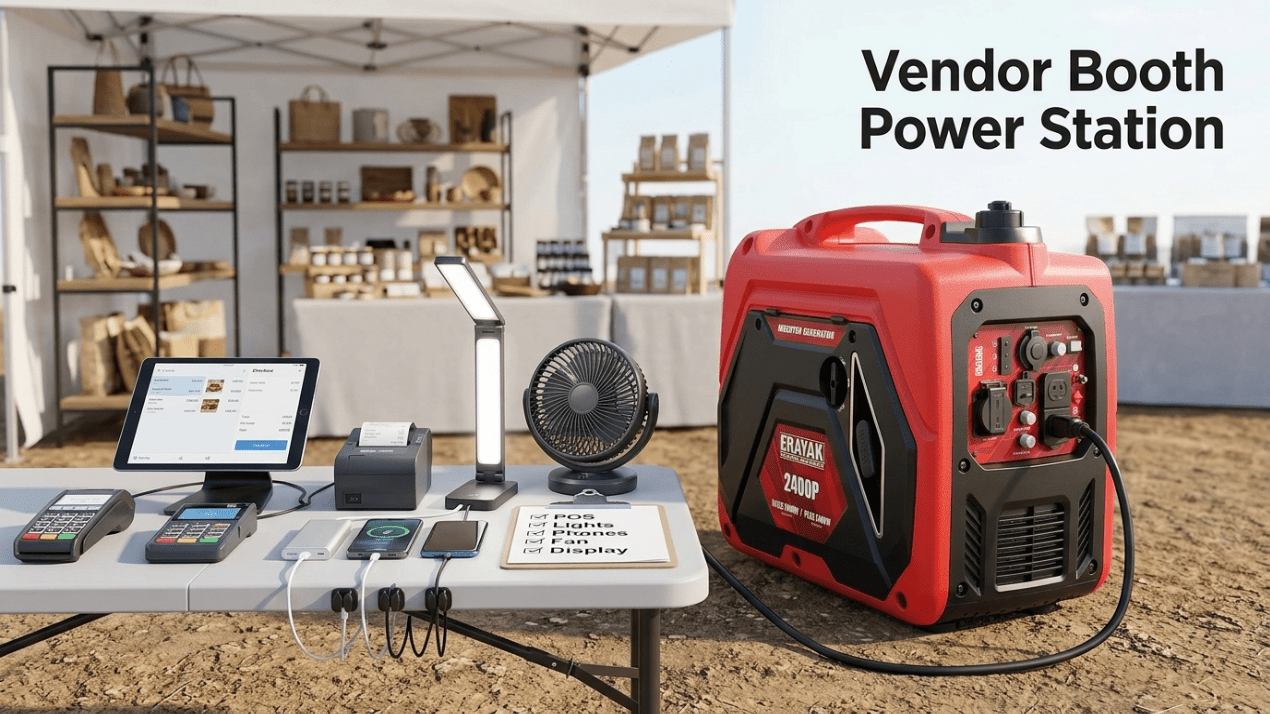
Pop-Up Booth Power Setup: Generator Solution for Markets and Vendor Events
A pop-up booth needs reliable power for more than one device. A good setup keeps your POS system online, phones charged, lights visible, fans running, displays powered, and products protected without creating cord clutter, noise problems, or generator safety risks.
Quick Answer
For a small vendor booth with POS system, tablet, phone charging, LED lights, card reader, display screen, barcode scanner, and a small fan, the Erayak 2400P is a practical compact power solution. Build one dry power table behind the booth and keep customer-facing walkways free of cords.
For a larger farmers market booth, pop-up shop, craft fair display, food sampling table, cooler, brighter lighting, multiple devices, or longer event runtime, the Erayak 4500P or 4500PD gives more headroom. Use high-watt appliances such as coffee makers, kettles, or warmers in planned time blocks instead of stacking them with cooler and display loads.
Pop-Up Booth Power Layout
The most reliable vendor booth power setup uses four zones: generator zone, power table, checkout zone, and customer zone. The generator stays outdoors in a safe, ventilated location. The power table keeps charging and cords organized. The checkout zone stays clean and easy to operate. The customer zone stays free of cord hazards.
Generator Zone
Place the generator outdoors on dry stable ground, away from tents, booth walls, enclosed trailers, customer lines, doorways, windows, and air intakes.
Power Table
Keep chargers, power banks, POS backup battery, cables, and small electronics in one organized dry location behind the booth.
Customer Zone
Keep customer walkways, checkout lines, product browsing areas, and food-service paths clear of cords and generator equipment.
POS, Card Reader, and Checkout Power
For many vendors, checkout power is the most important load. A booth can still operate with lower lighting or no fan, but a dead tablet, phone, card reader, router, or receipt printer can stop sales.
| Checkout Load | Role | Power Strategy |
|---|---|---|
| Tablet or POS terminal | Primary checkout device | Keep fully charged and connected to the dry power table when needed |
| Phone | Backup checkout, hotspot, communication | Keep a dedicated charging cable and power bank ready |
| Card reader | Payment processing | Charge before the event and top off during slow periods |
| Receipt printer | Printed receipts or order tickets | Place near checkout but route the cable away from customer traffic |
| Mobile hotspot or router | Backup internet | Keep powered and protected from heat, rain, and direct sun |
Lighting, Signage, and Product Display Power
Lighting and signage help customers find your booth, see product details, and understand pricing. Most LED lights and small display screens are manageable loads, but they should still be organized and protected from water, wind, and foot traffic.
| Display Load | Use Case | Setup Strategy |
|---|---|---|
| LED booth lights | Product visibility | Use efficient lighting and secure cables along booth frames |
| LED sign or lightbox | Brand visibility | Power from the booth’s organized power table |
| Small display screen | Product demo, pricing, brand video | Keep stable, shaded, and away from customer bumps |
| Label printer or barcode scanner | Inventory and product handling | Keep near checkout, not in the customer walkway |
| Rechargeable display lights | Backup lighting | Charge during setup or slower event periods |
Fan, Cooler, and Comfort Gear Setup
Outdoor events can be hot, crowded, and long. A small fan can make the booth more comfortable. A portable cooler may help protect drinks, samples, flowers, cosmetics, handmade goods, or temperature-sensitive products. These loads should be planned around checkout and display priorities.
| Booth Comfort Load | Why It Matters | Power Strategy |
|---|---|---|
| Small fan | Vendor comfort and airflow | Place behind the booth and keep cords away from customer paths |
| Portable cooler | Food, drinks, samples, or temperature-sensitive products | Check model requirements and avoid stacking with high-watt appliances |
| Battery chargers | Backup for cameras, lights, scanners, and devices | Batch charge during slower traffic periods |
| Coffee maker or kettle | Vendor comfort or sampling | Use briefly and separately from other high-watt loads |
| Small warmer | Food sample or product demo | Confirm event rules and use only when power capacity allows |
Cord Routing for Customer Safety
Vendor events involve customer lines, kids, strollers, carts, pets, neighboring booths, and changing weather. Good cord routing protects customers, products, and equipment.
| Cord Problem | Why It Matters | Better Setup |
|---|---|---|
| Cords across customer walkway | Trip hazard and liability risk | Route cords behind the booth or along booth frame edges |
| Connections on wet grass or pavement | Shock and equipment risk | Keep connections dry, elevated, and protected |
| Loose cables near checkout | Can pull down POS devices or printers | Use cable clips, ties, and a dedicated checkout cable path |
| Generator too close to booth wall | Exhaust, heat, and carbon monoxide risk | Keep generator in an open, ventilated outdoor zone |
| Shared cords between booths | Overload and confusion risk | Keep your booth’s load plan separate and clearly labeled |
Recommended Erayak Setup by Vendor Scenario
Erayak 2400P: Compact Vendor Booth Power Station
Choose the Erayak 2400P for a compact vendor booth with POS system, phone charging, tablet, card reader, LED lights, small display screen, label printer, small fan, and battery chargers.
- Strong fit for checkout, charging, LED lighting, and small electronics
- Good for craft fairs, farmers markets, pop-up shops, and brand booths
- Best when cooler and high-watt appliances are limited or rotated carefully
Erayak 4500P: Larger Booth With Cooler and Display Loads
Choose the Erayak 4500P when your booth includes POS, brighter lighting, fans, display screens, portable cooler, label printer, phone charging, product demo equipment, and longer event runtime.
- Gas-only portable inverter generator
- Manual recoil start
- 55 lb lightweight design
- 2.25 gal fuel tank
- Up to 8 hours runtime
- THD < 1.2% for sensitive electronics
- 60.5 dB noise level
Erayak 4500PD: Fuel Flexibility for Full-Day Vendor Events
Choose the Erayak 4500PD when you want 4,500W-class vendor booth power with gasoline and propane flexibility for full-day markets, larger booths, product demos, and longer outdoor events.
- Gasoline and propane flexibility
- Useful for full-day markets and outdoor vendor events
- Good fit for POS, lighting, display screens, cooler support, fans, and load rotation
Vendor Booth Generator Safety Checklist
A generator can help your booth stay open and professional, but it must be placed safely. Never run a fuel-powered generator inside a booth, enclosed tent, trailer, van, storage shed, garage, or any partially enclosed structure.
- Run the generator outdoors only.
- Keep it away from booth walls, enclosed tents, trailers, vans, doors, windows, vents, air intakes, and customer lines.
- Point exhaust away from customers, vendors, neighboring booths, tents, food areas, and buildings.
- Never run a generator inside a vendor tent, enclosed canopy, trailer, van, storage booth, garage, or shed.
- Keep the generator dry and away from standing water.
- Use properly rated outdoor extension cords.
- Keep cords away from customer walkways, checkout lines, food prep areas, wet ground, and product displays.
- Use cable covers, clips, or ties to reduce trip hazards.
- Do not overload the generator.
- Let the generator cool before refueling.
- Store fuel away from customers, tents, heat, flames, food areas, and merchandise.
- Follow market, venue, city, park, fire marshal, and event organizer rules.
Build a More Reliable Vendor Booth Power Setup
For POS systems, card readers, phones, tablets, LED lights, small displays, fans, and compact booth electronics, choose the Erayak 2400P. For larger booths, cooler support, display screens, product demos, and full-day event headroom, choose the Erayak 4500P or 4500PD.
FAQ: Pop-Up Booth Power Setup
Can a generator power a vendor booth?
Yes. A properly sized inverter generator can power POS systems, tablets, phones, card readers, LED lights, small displays, label printers, fans, and booth charging equipment when placed safely outdoors and connected with properly rated cords.
How should I set up power for a farmers market booth?
Place the generator outdoors away from tents, customer lines, enclosed spaces, doors, windows, and air intakes. Route one properly rated outdoor cord to a dry power table behind the booth, then organize checkout, lighting, charging, and display loads from that point.
Can a 2400 watt generator run a POS system and booth lights?
Yes, in many vendor booth setups. A 2,400W-class inverter generator can support a POS system, phone charging, tablet, card reader, LED lights, small display screen, and small fan when loads are managed properly.
Can I run a portable cooler at a vendor booth?
Yes, if the generator and cords are sized for the cooler’s requirements. Check the cooler’s label or manual and avoid stacking cooler startup with high-watt appliances such as kettles, coffee makers, or warmers.
Where should I place a generator at a pop-up event?
Place it outdoors on dry stable ground, away from customer lines, booth walls, enclosed tents, trailers, vehicles, doors, windows, vents, food areas, and neighboring booths. Point exhaust away from people and structures.
Can I run a generator inside a vendor tent?
No. Never run a generator inside a vendor tent, enclosed canopy, trailer, van, shed, garage, or any partially enclosed space. Carbon monoxide can build up quickly and is deadly.
What Erayak generator is best for a vendor booth?
Choose the Erayak 2400P for POS, charging, LED lights, small displays, and compact booth electronics. Choose the Erayak 4500P or 4500PD for larger booths with cooler support, fans, display screens, product demos, and more headroom.
