

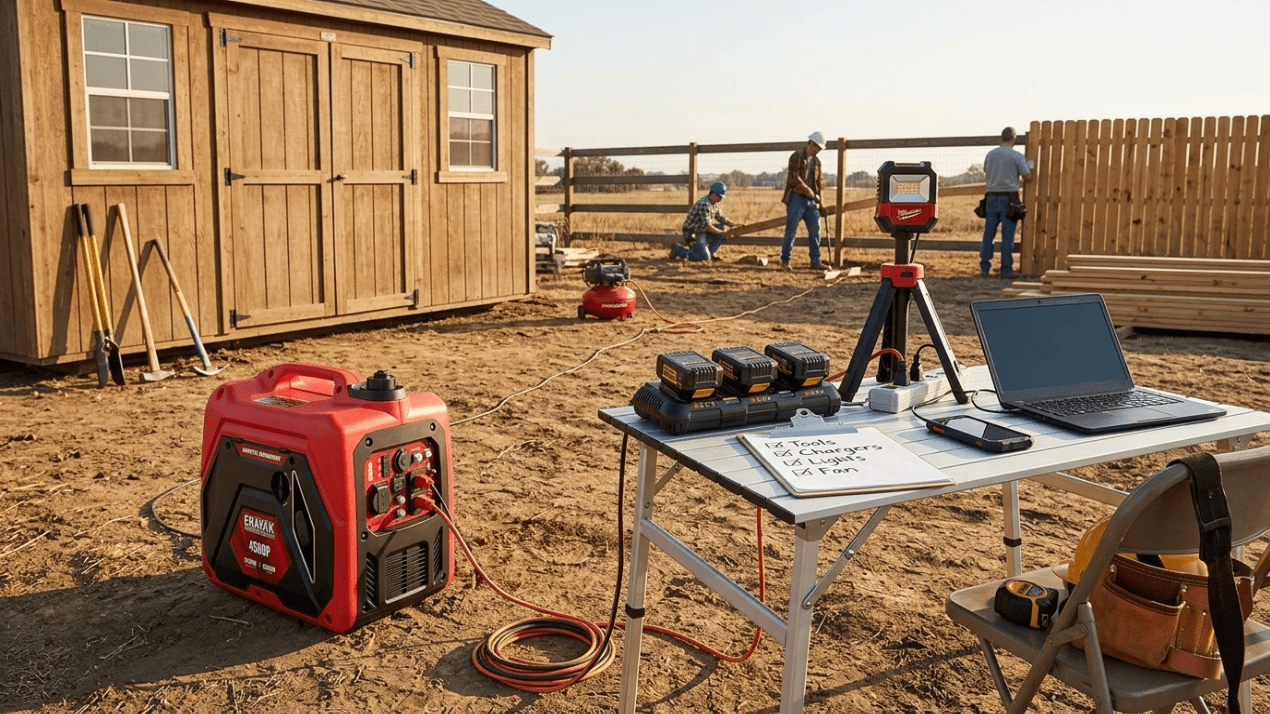
Remote Jobsite Power Setup: Generator Solution for Tools, Lights, and Chargers
A remote jobsite needs power that is organized, safe, and easy to manage. Whether you are repairing a fence, working on a shed, building outdoors, maintaining equipment, or running a small mobile work crew, the right setup keeps battery chargers, corded tools, work lights, fans, and compressors powered without turning the jobsite into a cord hazard.
Quick Answer
For a light outdoor work setup with battery chargers, LED work lights, phones, laptop, small fan, and occasional light tools, the Erayak 2400P can work as a compact jobsite power station. For more serious work with saws, drills, grinders, multiple battery chargers, air compressor use, and longer runtime needs, the Erayak 4500P is usually the better starting point.
For larger remote jobsites, selected 120V/240V planning, higher tool surge, pump loads, and more outlet flexibility, the Erayak 6800 series provides more headroom. The goal is not just to run tools; it is to create a safe generator zone, charging table, tool zone, and cord path that keeps work moving.
Remote Jobsite Power Layout
A reliable worksite power setup uses four zones: generator zone, charging station, tool zone, and traffic zone. The generator stays outside in an open ventilated area. Chargers and small electronics stay on a protected table. Tools are used in the work zone. Walkways, ladders, saw stands, and vehicle paths stay clear of cords.
Generator Zone
Place the generator outdoors on dry stable ground, away from garages, sheds, doors, windows, vents, vehicles, and enclosed work areas.
Charging Station
Use one table for tool batteries, phone charging, laptop, radio, task light, and spare chargers.
Tool Zone
Keep saws, drills, grinders, air compressor, and work lights organized by task instead of scattering cords across the site.
Battery Charger and Tool Charging Station
Many modern jobsites rely on cordless tools. That means your generator may spend more time powering battery chargers than corded tools. A clean charging station helps prevent lost batteries, tangled cords, overheated chargers, and dead tools halfway through the job.
| Charging Load | Role on Jobsite | Setup Strategy |
|---|---|---|
| Tool battery chargers | Keep cordless drills, saws, impact drivers, and lights ready | Batch charge batteries and avoid covering charger vents |
| Phone and tablet charging | Communication, plans, photos, and measurements | Keep devices on a dry table away from sawdust and debris |
| Laptop or small monitor | Plans, invoices, diagnostics, or camera review | Use inverter generator power for electronics-friendly operation |
| Radio or speaker | Communication or jobsite audio | Keep volume reasonable and route cords away from work paths |
| Rechargeable work lights | Task lighting backup | Charge during daylight or low-tool-use periods |
Corded Tools and High-Startup Loads
Corded tools can create startup surge when the motor starts, especially saws, grinders, compressors, and pumps. The best approach is to run one high-demand tool at a time and avoid stacking motor starts with multiple chargers, lights, and compressor cycling.
| Jobsite Load | Load Type | Power Strategy |
|---|---|---|
| Circular saw / miter saw | Motor load | Start separately and avoid running with other large tools |
| Angle grinder | Motor load | Use one high-demand tool at a time |
| Air compressor | Motor and cycling load | Allow startup headroom and avoid stacking with saw startup |
| Shop vac | Motor load | Run after cutting or sanding, not during peak tool startup |
| Battery chargers | Low to moderate electronics load | Easy to combine, but do not overload the power strip |
| Work lights | Low to moderate load | Use LED lights to reduce generator demand |
Work Lights, Fans, and Comfort Gear
A jobsite power setup is not only about tools. Work lights improve visibility, fans help with heat and airflow, and device charging keeps communication open. These loads are easier to manage when grouped at a charging station instead of spread across the site.
| Support Load | Why It Matters | Setup Strategy |
|---|---|---|
| LED work lights | Better visibility for cutting, fastening, painting, and cleanup | Use efficient lights and keep cords visible |
| Small fan | Comfort during hot outdoor work | Keep away from sawdust, wet areas, and unstable surfaces |
| Battery chargers | Tool uptime | Use a dry charging table with clear labeling |
| Task light near plans | Improves measurement and layout work | Keep low-load lighting separate from tool cords |
| Phone / camera charging | Photos, measurements, calls, and documentation | Keep devices protected from dust and weather |
Extension Cord Routing and Jobsite Hazards
Remote jobsites often have uneven ground, lumber, ladders, vehicles, saw stands, extension cords, and moving workers. Cord routing should be planned before work begins. Use properly rated outdoor extension cords and keep connections dry, visible, and away from cutting areas.
| Cord Problem | Why It Matters | Better Setup |
|---|---|---|
| Cords across walking paths | Trip hazard when carrying tools or materials | Route along site edges or use visible cord covers where appropriate |
| Connections on wet ground | Shock and equipment risk | Keep connections dry and elevated |
| Cords near saw blades or grinding areas | Cut or damaged insulation risk | Route cords behind the tool path, not across it |
| Undersized cords | Overheating and voltage drop risk | Use cords rated for the load and distance |
| Generator too close to enclosed work area | Carbon monoxide risk | Keep the generator outdoors and away from doors, windows, vents, sheds, and garages |
Recommended Erayak Setup by Worksite Scenario
Erayak 2400P: Compact Charging and Light-Duty Work Setup
Choose the Erayak 2400P for battery chargers, phones, laptop, LED work lights, small fans, task lighting, and occasional light-duty tool use.
- Strong fit for tool charging stations and LED work lights
- Good for DIY outdoor work, mobile repairs, and light-duty jobsites
- Best when large corded tools and compressors are limited or rotated carefully
Erayak 4500P: Best Starting Point for Portable Jobsite Power
Choose the Erayak 4500P when your worksite includes multiple battery chargers, LED work lights, fans, saws, grinders, shop vac use, and managed compressor or motor loads.
- Gas-only portable inverter generator
- Manual recoil start
- 55 lb lightweight design
- 2.25 gal fuel tank
- Up to 8 hours runtime
- THD < 1.2% for sensitive electronics
- 60.5 dB noise level
Erayak 4500PD: Fuel Flexibility for Longer Outdoor Workdays
Choose the Erayak 4500PD when you want 4,500W-class jobsite power with gasoline and propane flexibility for longer outdoor workdays, remote repairs, and more flexible fuel planning.
- Gasoline and propane flexibility
- Useful for longer remote workdays and outdoor maintenance
- Good fit for chargers, lights, fans, tools, and managed high-demand loads
Erayak 6800PD / 6800PT: More Headroom for Larger Worksite Loads
Choose the Erayak 6800 series when your remote jobsite needs more surge headroom, selected 120V/240V planning, pump support, larger tool loads, or multiple work zones.
- 6800W peak power
- 5000W rated power on gasoline at 100% output
- 30A L5-30R outlet
- 30A 120V/240V L14-30R outlet
- Dual 120V household outlets
- TT-30R RV adapter accessory included
Jobsite Generator Safety Checklist
A generator can make a remote jobsite productive, but it must be placed and connected safely. Never operate a fuel-powered generator inside a garage, shed, trailer, van, workshop, enclosed canopy, basement, crawlspace, or partially enclosed structure.
- Run the generator outdoors only.
- Keep it away from garages, sheds, trailers, vehicles, doors, windows, vents, air intakes, and enclosed work areas.
- Point exhaust away from workers, buildings, vehicles, tents, and neighboring spaces.
- Never run a generator inside a garage, shed, van, trailer, workshop, basement, crawlspace, or enclosed canopy.
- Keep the generator dry and away from standing water.
- Use properly rated outdoor extension cords.
- Keep cords away from saw blades, grinders, hot tools, wet ground, vehicle paths, and foot traffic.
- Do not overload the generator.
- Start high-demand tools one at a time.
- Let the generator cool before refueling.
- Store fuel away from sparks, flame, tools, work debris, and enclosed spaces.
- Follow workplace, site, venue, and local safety rules.
Build a Safer Remote Jobsite Power Setup
For charging stations, LED work lights, phones, laptops, and light-duty outdoor work, choose the Erayak 2400P. For saws, grinders, shop vacs, compressor planning, multiple chargers, and more worksite headroom, choose the Erayak 4500P or 4500PD. For larger work zones and selected 120V/240V needs, choose the Erayak 6800 series.
FAQ: Remote Jobsite Power Setup
Can a portable generator power a remote jobsite?
Yes. A properly sized portable inverter generator can power battery chargers, LED work lights, phones, laptops, fans, and many corded tools when loads are managed safely.
How should I set up generator power at an outdoor worksite?
Place the generator outdoors in a safe ventilated area, route a properly rated outdoor extension cord to a dry charging station, and keep tool cords away from walkways, saw paths, wet ground, and vehicle traffic.
Can a 2400 watt generator run tool battery chargers?
Yes. A 2,400W-class inverter generator is a practical fit for tool battery chargers, LED work lights, phones, laptop charging, small fans, and light-duty worksite electronics.
Can a generator run an air compressor?
Yes, if the generator is sized for the compressor’s running and starting requirements. Air compressors can have motor startup demand, so avoid starting them at the same time as saws, grinders, or shop vacs.
Can I run multiple power tools at the same time?
It is better to run high-demand tools one at a time. Avoid stacking saw, grinder, compressor, and shop vac startup loads unless the generator and cords are rated for the combined demand.
Where should I place a generator at a jobsite?
Place it outdoors on dry stable ground, away from garages, sheds, trailers, vehicles, doors, windows, vents, air intakes, enclosed work areas, and worker traffic. Point exhaust away from people and structures.
What Erayak generator is best for remote jobsite power?
Choose the Erayak 2400P for charging stations and light-duty worksite loads. Choose the Erayak 4500P or 4500PD for saws, grinders, lights, fans, multiple chargers, and managed compressor use. Choose the Erayak 6800 series for larger worksite loads and selected 120V/240V planning.
