

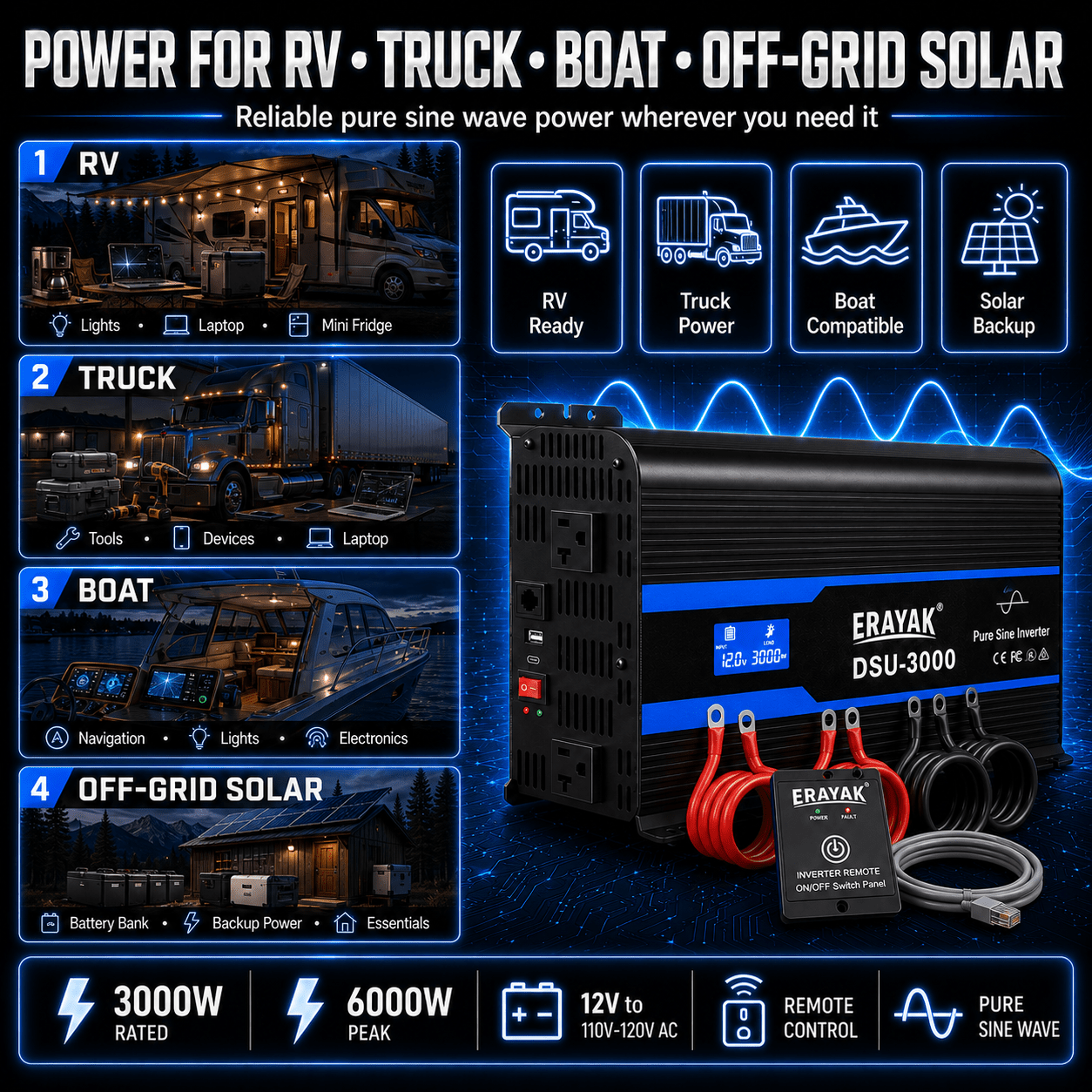
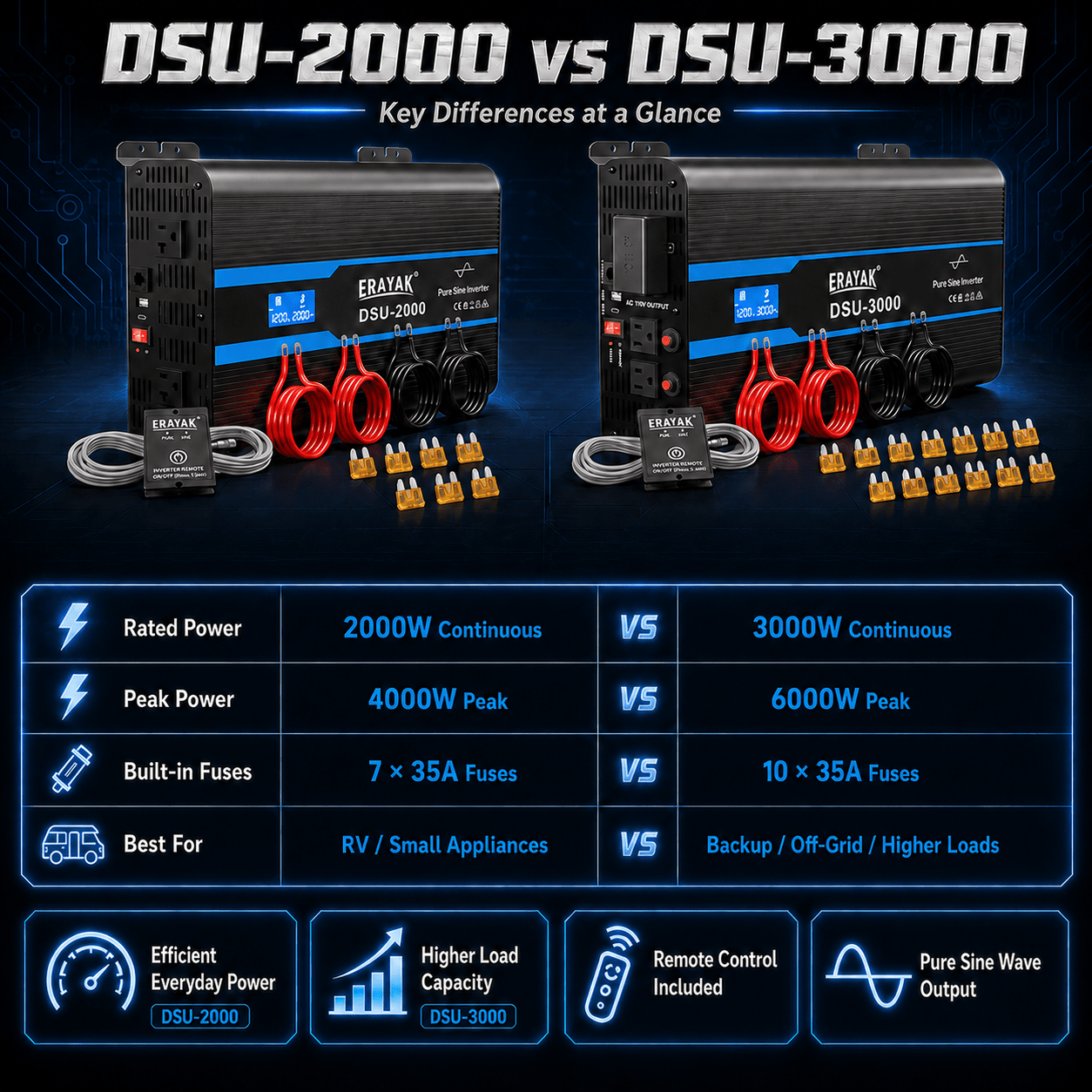
Inversor de onda sinusoidal pura T1000 de 1000 W, convertidor CC CA, ideal para el hogar solar RV
Free US shipping. Sales tax calculated at checkout.
- 【POTENTE CC a CA】100 W máx. continuo, sobretensión máxima de 2000 W durante el arranque con carga en frío, onda sinusoidal pura de 12 V a 120 VCA.
- 【SEGURO DE USO】Pantalla LCD incorporada para estimación de carga, monitor de capacidad/voltaje de la batería y código de solución de problemas. Indicador LED para protección contra bajo/sobrevoltaje, protección contra sobretemperatura, protección contra sobrecarga e indicación de cortocircuito. Ventiladores de refrigeración y protección del interruptor de circuito de falla a tierra (GFCI).
- 【PROTEJA SUS ELECTRÓNICAS】El avanzado inversor de onda sinusoidal pura de Erayak proporciona CA de calidad equivalente a la energía de la red, lo que protegerá y extenderá la vida útil de sus dispositivos electrónicos y electrodomésticos. Con sus cargas inductivas altas y silenciosas, no se producen zumbidos extraños cuando se encienden los componentes electrónicos inductivos y les permite funcionar de manera más suave, fría y silenciosa.
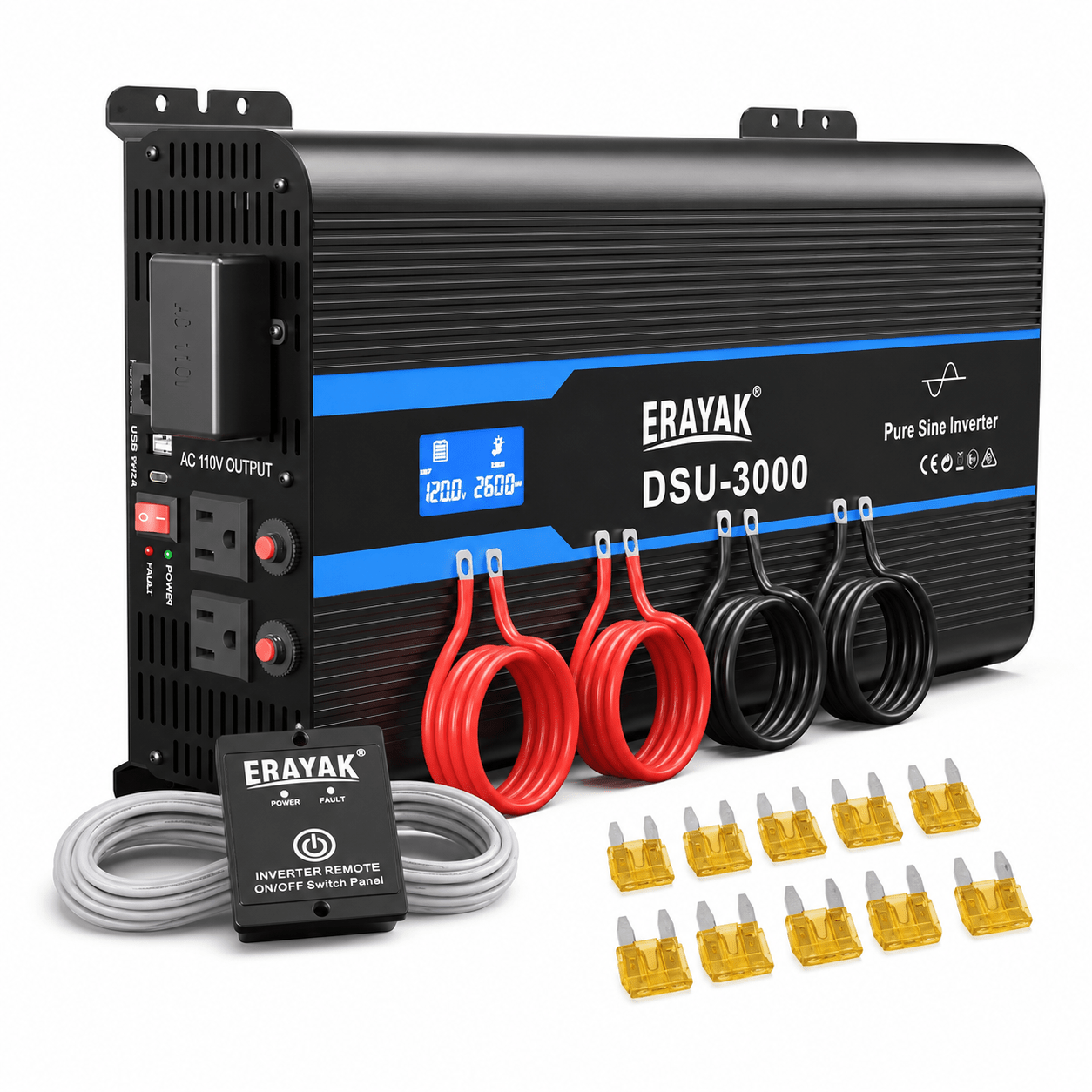
- 【FÁCIL DE USAR】 Ofrece un puerto tipo C y un puerto USB de 5 V/2,1 A, 3 salidas de CA y 1 bloque de terminales de CA, junto con dos cables 4 AWG de 1,6 pies y un control remoto con cable de 2 pies.
| Modelo | 110V |
220V |
| Energía continua | 1000W | |
| Potencia máxima | 2000W | |
| Tensión de salida sin carga (@ tensión de entrada nominal) |
CA 230 V +/- 10 V, CA 110 V +/- 10 V | |
| Voltaje de salida de carga (@ voltaje de entrada nominal) |
CA 210 V -240 V, CA 110 V +/- 10 V | |
| Frecuencia | 50 Hz +/- 0,5 Hz, 60 Hz +/- 0,5 Hz | |
| Salida USB (tipo A o C opcional) | Tipo A (CC 5 V, 2100 mA), Tipo C (18 W máx.) | |
| Onda de salida | Onda sinusoidal pura (THD < 5% @ carga normal) | |
| Tensión de entrada nominal | CC 13 V +/- 0,2 V | CC 26 V +/- 0,4 V |
| Rango de voltaje de funcionamiento | CC 11 V - 15 V | CC 22 V - 30 V |
| Sin corriente de carga | ≤1.0A | ≤0,6A |
| Máx. eficiencia | ≥85% | |
| Entrada de alarma de bajo voltaje | CC 10,5 V +/- 0,3 V | CC 21 V +/- 0,4 V |
| Protección de bajo voltaje de entrada | CC 9,5 V +/- 0,3 V | CC 19 V +/- 0,4 V |
| Protección contra sobretensión de entrada | CC 16 V +/- 0,3 V | CC 32 V +/- 0,4 V |
| Protección contra sobrecarga | 1100W - 1250W | |
| Sobretemperatura. protección | Sí, salida de apagado | |
| Protección contra cortocircuitos de salida | Sí, salida de apagado | |
| Polaridad inversa de entrada CC | Sí, por fusible | |
| Temperatura de funcionamiento. | -15°C ~ +25°C; 60°C @ 40% de carga de energía | |
| Temperatura de almacenamiento. y humedad | -30°C ~ +70°C, 10 ~ 95% de humedad relativa | |
| Dimensión (largo x ancho x profundidad) | 384*210*102 mm | |
| Embalaje | caja, 3 piezas/caja, 46*45*28,5 cm | |
| Aplicación | Electrodomésticos para el hogar y la oficina, equipos de energía portátiles, vehículos, yates y sistemas de energía solar fuera de la red...etc. | |
| Tipo de enchufe | Europeo/Francia/Italiano/Reino Unido/Australia/Americano/Universal/Sudafricano/Brasileño, etc. | |
| Warranty & Support | Coverage Details |
|---|---|
| Warranty Duration | 1-Year Limited Warranty for eligible ERAYAK DSU-3000 purchases, subject to applicable warranty terms, proof of purchase, product condition, and technical verification. |
| Warranty Coverage | Coverage applies to eligible manufacturing defects and product malfunctions that occur under normal use during the applicable warranty period. |
| Technical Diagnosis | ERAYAK Technical Support may assist with troubleshooting low-voltage alarm or shutdown, input over-voltage shutdown, overload shutdown, over-temperature shutdown, output short circuit, fuse failure, cooling-fan issues, LCD fault codes, AC outlet reset issues, remote-control issues, and DC battery-connection problems before confirming the appropriate warranty solution. |
| Replacement Parts Support | For eligible warranty issues, ERAYAK may provide applicable replacement parts, troubleshooting assistance, or other appropriate service solutions after technical verification and warranty review. |
| Fuse Support | The 12V DSU-3000 uses 10 × 35A fuses. ERAYAK Support can assist with fuse identification, replacement guidance, and troubleshooting when a fuse-related issue occurs. |
| Battery Connection Support | Support is available for the positive (+) and negative (-) DC input terminals, battery wiring, correct polarity, cable sizing, and related input-power troubleshooting. |
| LCD & Fault-Code Support | ERAYAK Support can assist with interpreting LCD information and fault codes including low voltage, over voltage, over temperature, overload, and output short-circuit conditions. |
| AC Outlet Reset Support | The DSU-3000 includes AC outlet reset buttons. ERAYAK Support can assist with outlet-reset procedures and related overload or short-circuit troubleshooting. |
| Remote Control Support | The DSU-3000 supports an optional remote-control system through an RJ12 port. ERAYAK Support can assist with compatible remote-control setup and operating questions. |
| Direct-Connect Terminal Support | The DSU-3000 includes a 110V direct-connect terminal. Connection and service should follow the DSU-3000 user guide and applicable electrical requirements. |
| Technical Support | ERAYAK provides assistance with product setup, 12V battery connection, load planning, pure sine wave operation, LCD monitoring, remote-control operation, outlet reset procedures, fault diagnosis, cooling and ventilation, and after-sales support for the DSU-3000. |
| Email Support | support@erayakpower.com Customers may submit proof of purchase, order information, photos, videos, battery information, LCD fault codes, and a description of the issue for technical review. |
| English Phone Support | +1 (573) 455-4565 English-speaking support is available for setup, troubleshooting, warranty questions, replacement-part assistance, and after-sales service. |
| WhatsApp Support | +1 (573) 455-4565 Contact ERAYAK via WhatsApp for convenient technical and after-sales assistance. |
| Warranty Claim Process | Contact ERAYAK Support with your proof of purchase, product model, order information, and a description of the issue. Photos, videos, battery information, connected-device details, LCD fault codes, installation information, or troubleshooting results may be requested before the appropriate warranty solution is confirmed. |
| Service & Repair | Do not open or disassemble the inverter. Unauthorized internal service may damage the product and may affect warranty eligibility. If internal repair is required, contact ERAYAK Support or qualified service personnel. |
Warranty Note: Warranty service is subject to the applicable ERAYAK warranty terms, proof of purchase, proper installation and operation, technical verification, and applicable exclusions. Incorrect polarity, improper wiring, excessive load, blocked ventilation, improper direct-connect wiring, moisture exposure, unauthorized disassembly or repair, physical damage, or operation outside the DSU-3000 user guide may affect warranty eligibility.
| U.S. Shipping | Details |
|---|---|
| U.S. Warehouses | ERAYAK provides local U.S. fulfillment from warehouses in California, New Jersey, and Georgia. |
| Order Processing | Most orders are confirmed and prepared for shipment within 24 hours after order verification. |
| Tracking Number | A tracking number is provided after the order is shipped so customers can follow the delivery status online. |
| Standard Delivery | Most standard orders are estimated to arrive within 2–4 business days after shipment. |
| Expedited Processing | Expedited service is available for eligible orders. Expedited orders receive priority order confirmation, faster warehouse processing, and priority logistics handling. |
| 2-Business-Day Delivery Option | A 2-business-day delivery option may be available for eligible products and destinations. Availability and any additional shipping charges should be confirmed before ordering. |
| Shipping Coverage | Delivery is available across most locations within the contiguous United States. |
| Hawaii & Offshore Areas | For Hawaii, U.S. islands, offshore territories, or other locations outside the contiguous United States, please contact ERAYAK Support before placing your order to confirm shipping availability and cost. |
| Warehouse Assignment | Orders are fulfilled from the most suitable U.S. warehouse based on product availability and the customer's delivery location. |
| Shipping Support | Email: support@erayakpower.com Phone: +1 (573) 455-4565 WhatsApp: +1 (573) 455-4565 |
Shipping Note: Delivery times are estimates and may vary based on inventory availability, destination, carrier conditions, weather, holidays, and other logistics factors. For urgent, remote-area, or special delivery requests, contact ERAYAK Support before placing your order.
| Specification | Details |
|---|---|
| Model | ERAYAK DSU-3000 |
| Product Type | 3000W Pure Sine Wave Power Inverter |
| Continuous Power | 3000W |
| Peak Power | 6000W |
| Rated Input Voltage | DC 13V for 12V Inverter |
| Operating Input Voltage Range | DC 11–15V |
| No-Load Output Voltage | AC 115V ±10V |
| Load Output Voltage | AC 115V ±10V |
| Output Frequency | 60Hz ±0.5Hz |
| Output Waveform | Pure Sine Wave |
| Total Harmonic Distortion | THD <5% at Normal Load |
| Maximum Efficiency | ≥85% |
| No-Load Current | ≤2.0A DC at 12V Input |
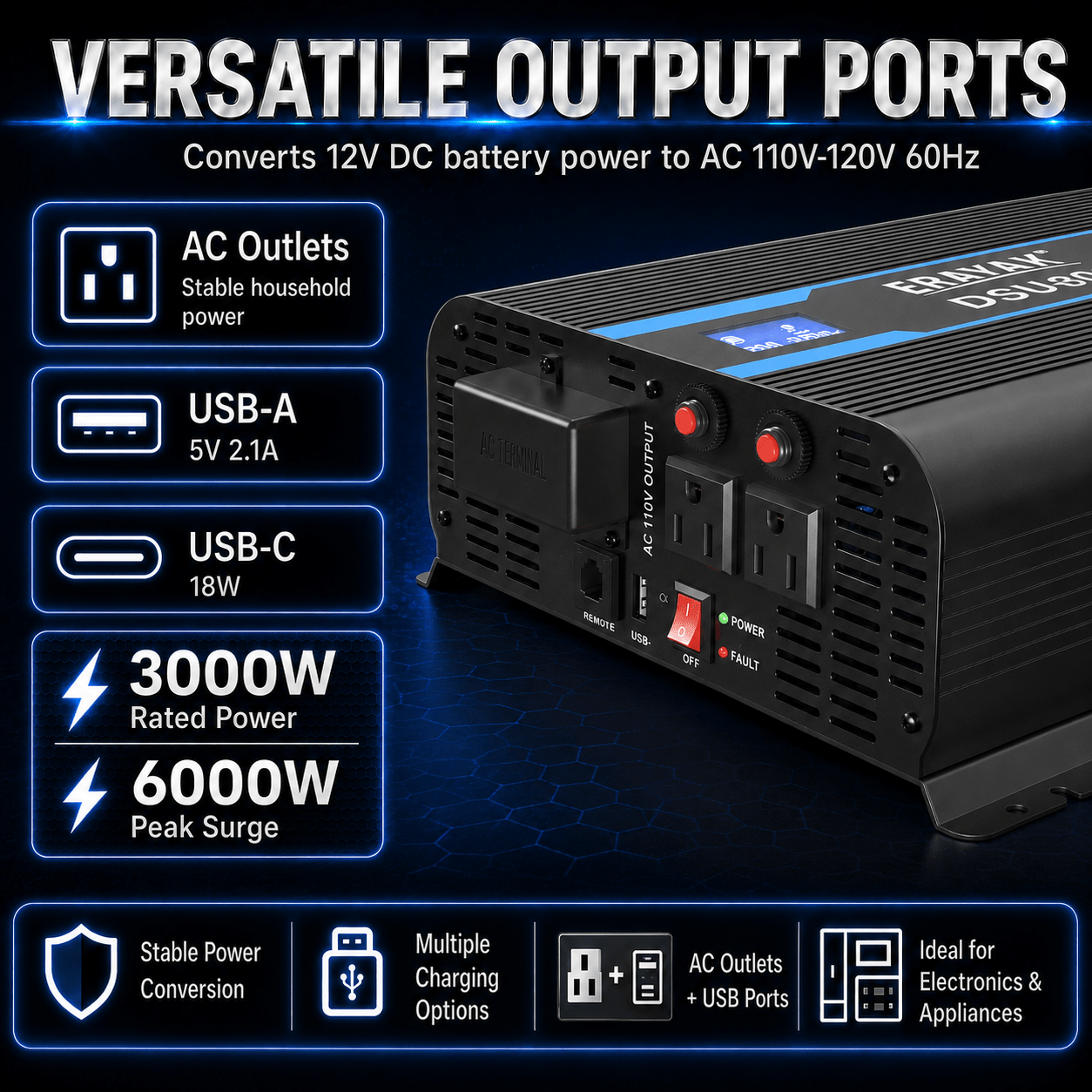
| AC Outlets | 3 AC Outlets Shown in the DSU-3000 Structural Drawing; Socket Type Depends on Actual Product Configuration |
| 110V Direct-Connect Terminal | Yes |
| AC Outlet Reset Buttons | Yes |
| USB-A Output | DC 5V / 2100mA |
| USB-C Output | 18W Max. |
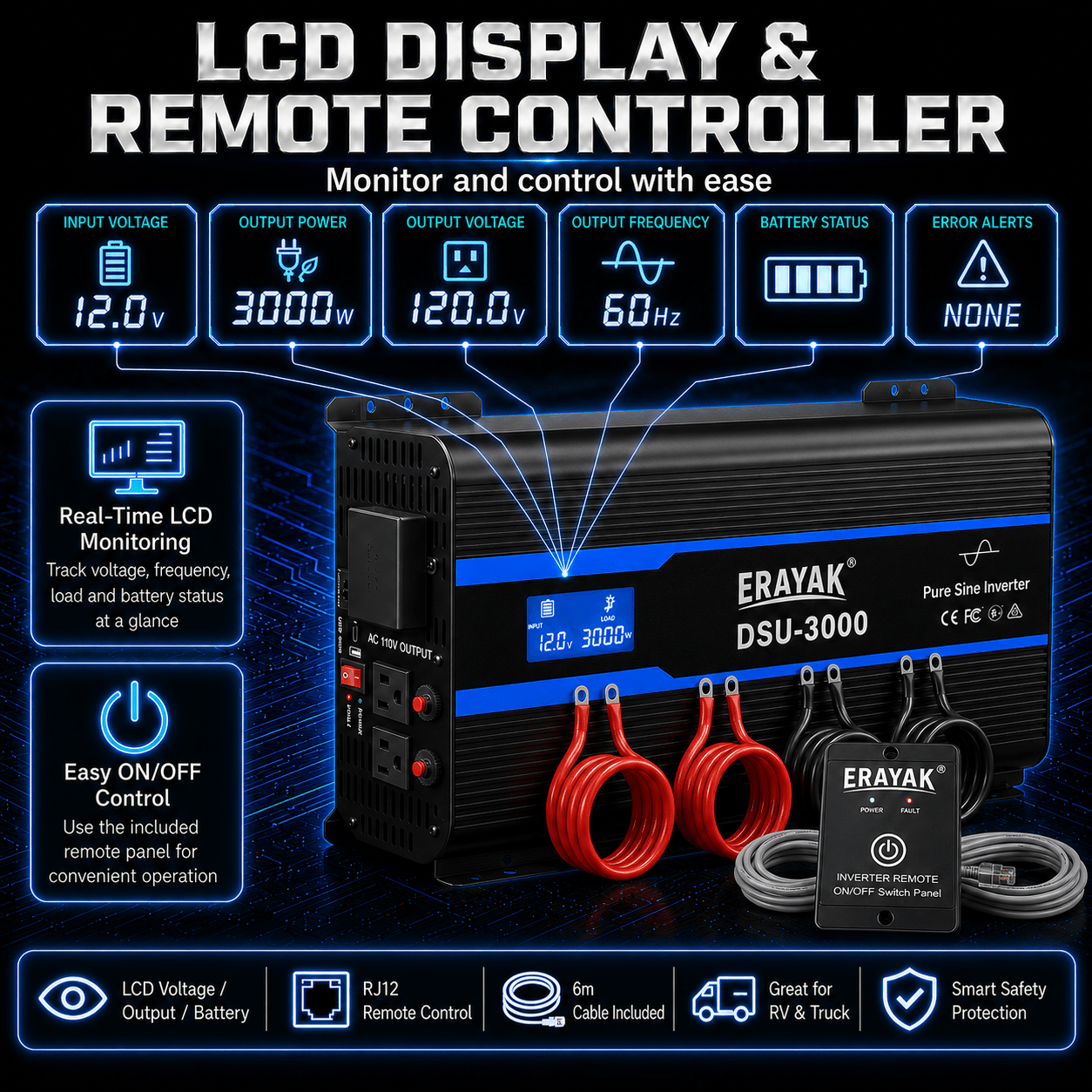
| LCD Display | Input Voltage, Load Power, Output Frequency, Output Current, Battery Power, and Fault Code |
| Fault Codes | E0: Low Voltage / E1: Over Voltage / E2: Over Temperature / E3: Overload / E4: Output Short Circuit |
| Input Low-Voltage Alarm | DC 10.5V ±0.3V |
| Input Low-Voltage Shutdown | DC 9.5V ±0.3V |
| Low-Voltage Recovery | Automatically Resumes at DC 12V ±0.3V |
| Input Over-Voltage Shutdown | DC 16V ±0.3V |
| Over-Voltage Recovery | Automatically Resumes at DC 14V ±0.3V |
| Overload Protection | Yes — Approximately 3100–3400W |
| Overload Recovery | Reduce Load to the Rated Range and Restart the Inverter; Automatic Recovery May Also Occur After the Specified Recovery Period |
| Over-Temperature Protection | Yes — Protection Starts Above 96°C |
| Output Short-Circuit Protection | Yes |
| Reverse-Polarity Protection | Fuse-Based Protection; Correct Battery Polarity Is Required |
| Cooling Method | Temperature-Controlled Fan System; Fan Starts at Approximately 65°C |
| Cooling Layout | Dual-Fan Rear Cooling Layout |
| Fuse Configuration | 10 × 35A for 12V DSU-3000 |
| Remote Control | Optional — RJ12 Port with 6 m Cable |
| Grounding Connection | Yes |
| Recommended Working Temperature | -15°C to 25°C |
| Recommended Long-Life Load | Within 85% of Rated Output Power |
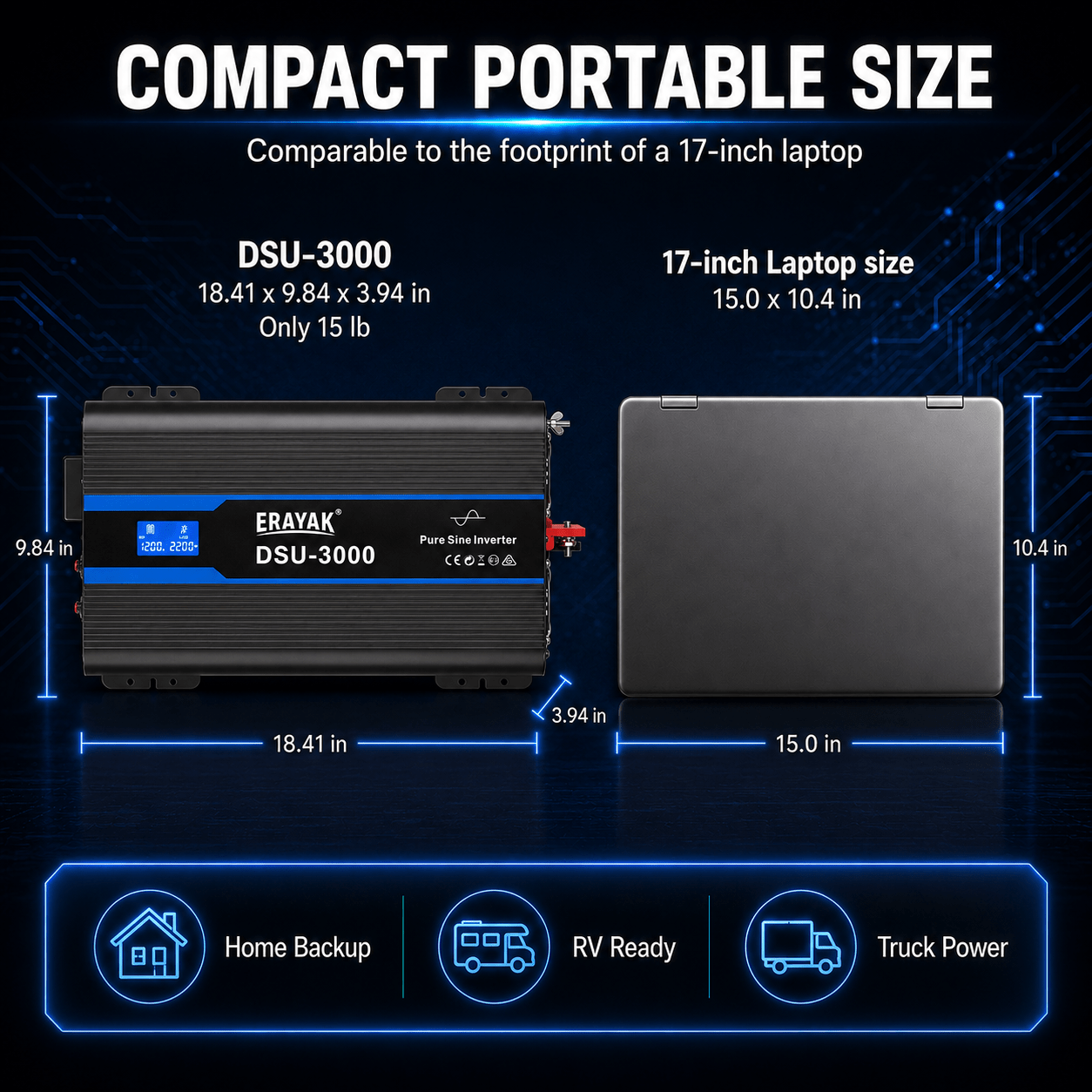
| Approximate Overall Dimensions | 467.5 × 250 × 100 mm / 18.41 × 9.84 × 3.94 in |
Performance Note: Actual inverter performance depends on battery condition, input voltage, cable size and length, connected load, startup demand, ambient temperature, ventilation, and installation conditions. For longer inverter service life, the user guide recommends keeping normal load within approximately 85% of rated output power.
1. 3000W Continuous Power
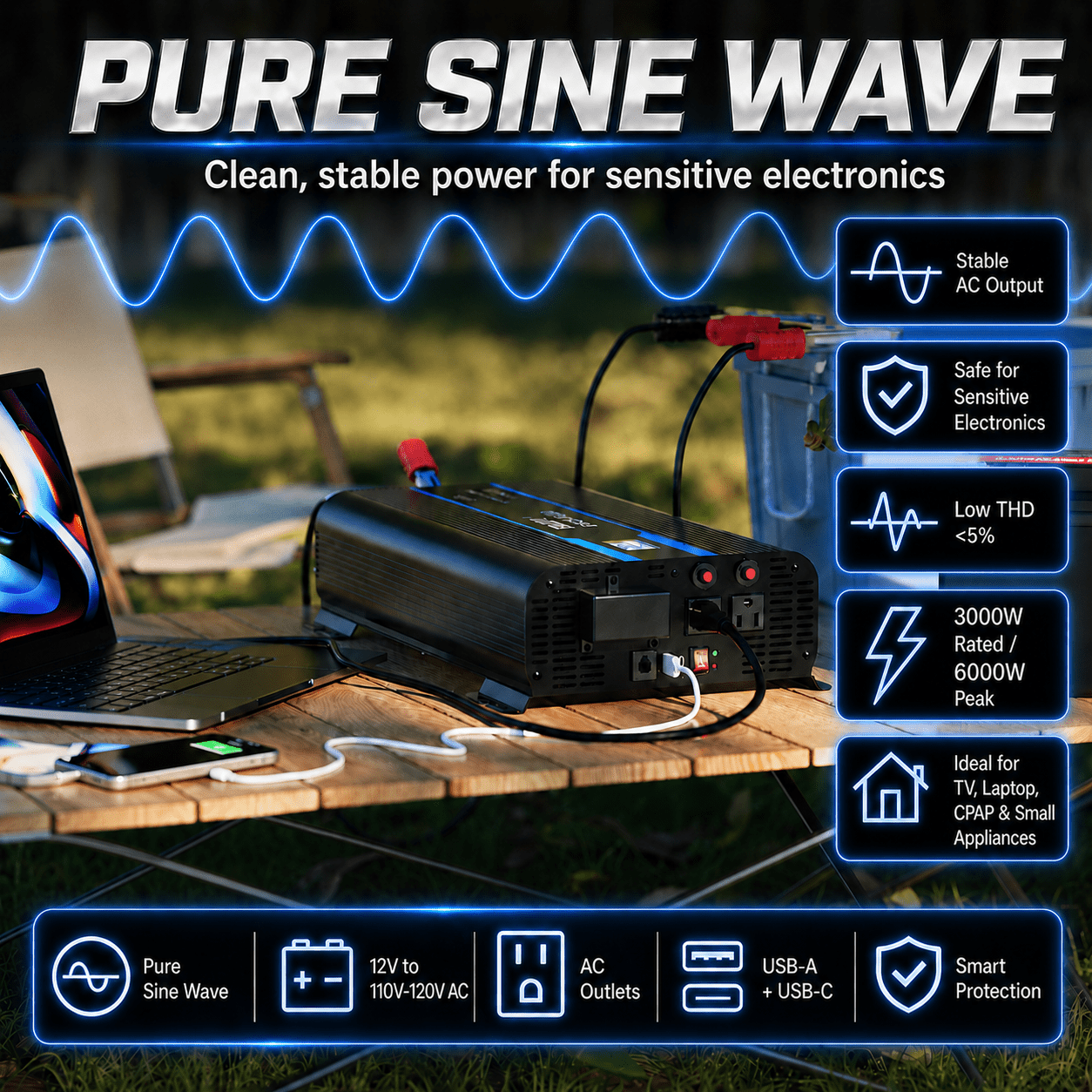
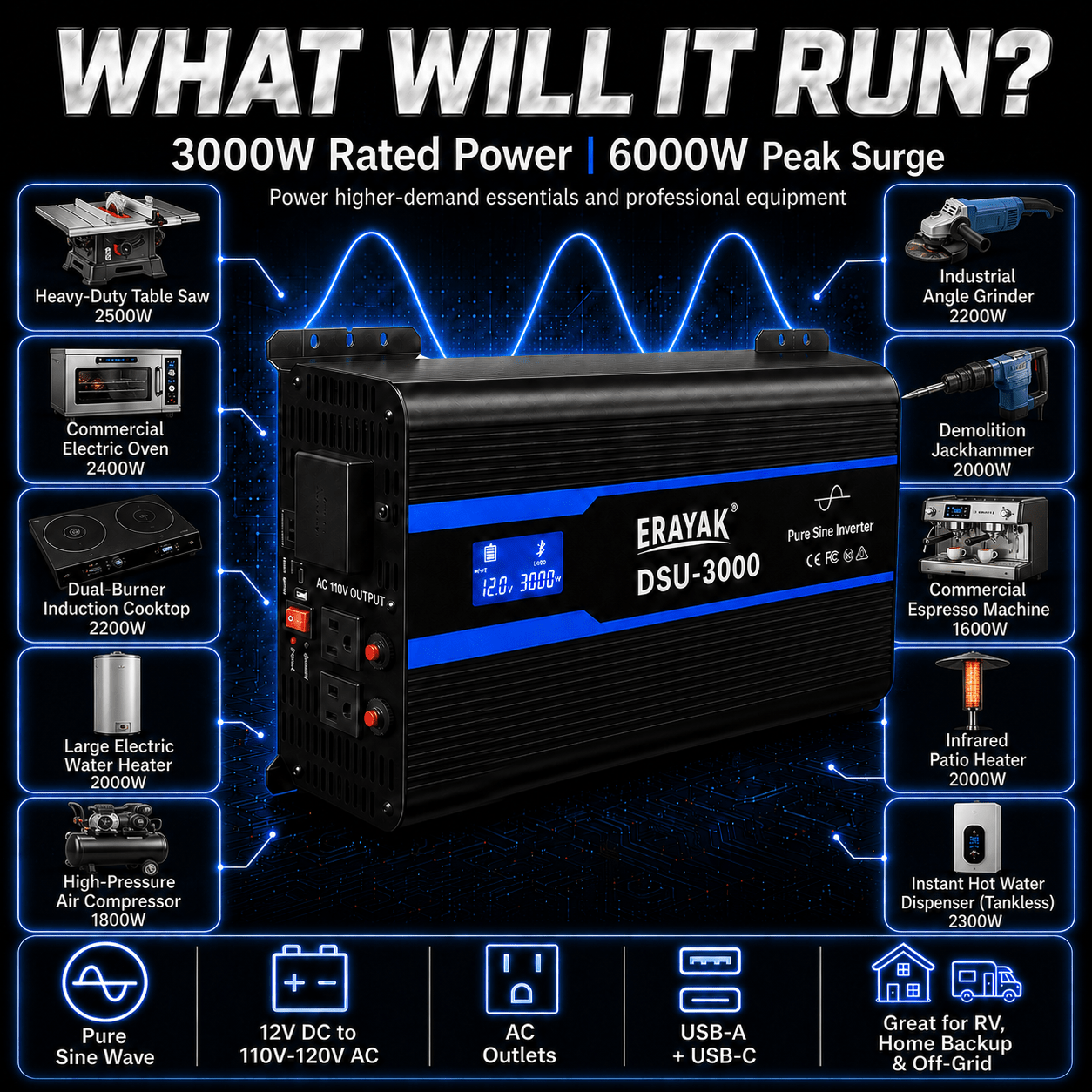
The DSU-3000 provides up to 3000W of continuous AC output and 6000W peak power for compatible 12V battery-powered applications.
2. Maximum Efficiency ≥85%
The DSU-3000 is rated for a maximum conversion efficiency of at least 85% under applicable operating conditions, helping convert available DC battery power into usable AC power.
3. Pure Sine Wave Output
Pure sine wave output with THD below 5% at normal load provides a cleaner AC waveform for compatible electronics, appliances, and other AC-powered equipment.
4. Smart Load Planning
For longer inverter service life, the user guide recommends keeping normal connected load within approximately 85% of the DSU-3000's rated 3000W output.
5. Temperature-Controlled Cooling
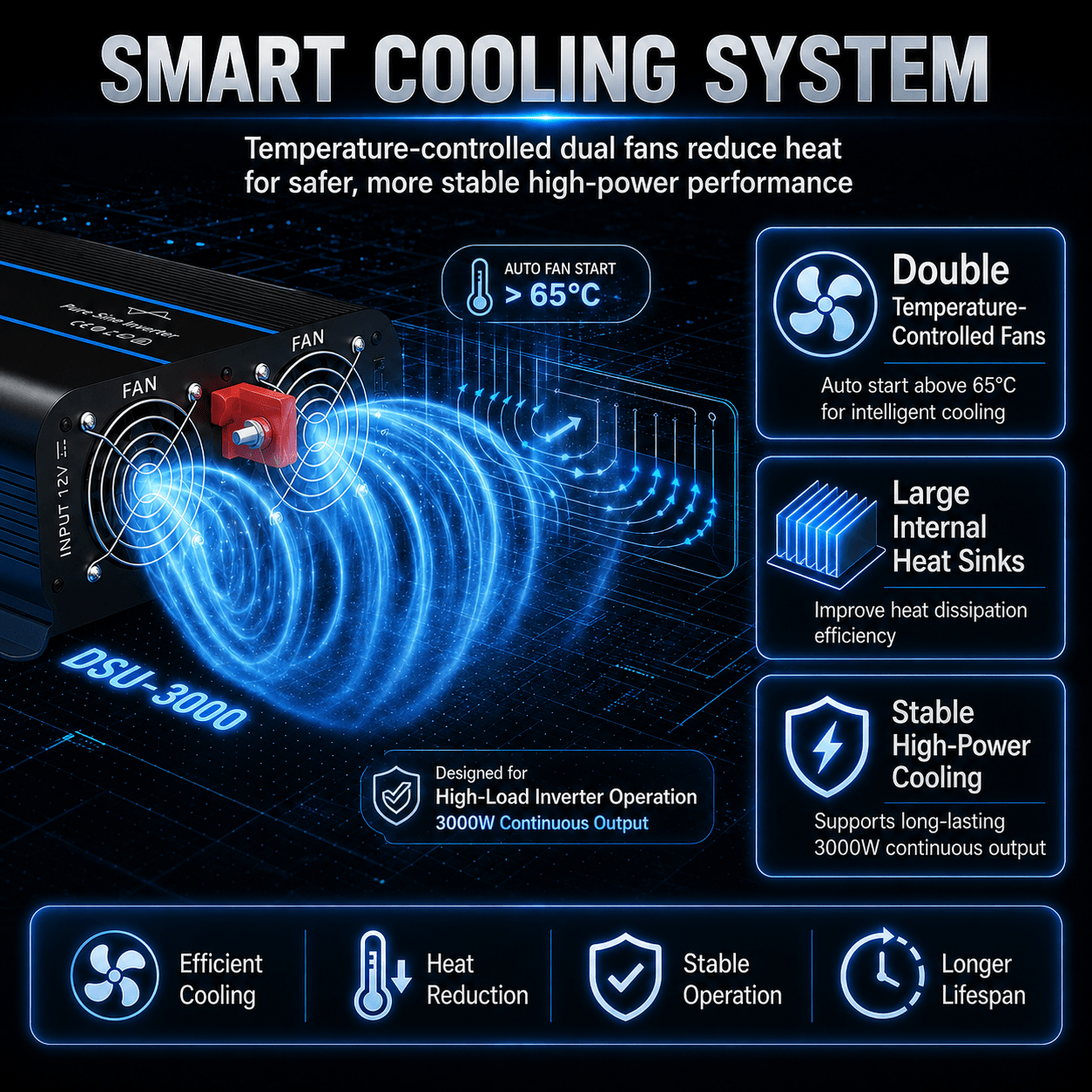
The cooling fans are temperature controlled and begin operating at approximately 65°C, helping provide additional cooling when internal temperature rises.
6. Real-Time Power Monitoring
The LCD display provides input voltage, load power, output frequency, output current, battery power, and fault-code information to help users monitor system conditions during operation.
7. Low-Voltage Battery Protection
The 12V DSU-3000 provides a low-voltage alarm at approximately 10.5V and shuts down at approximately 9.5V, helping reduce excessive battery discharge.
1. Low-Voltage Protection
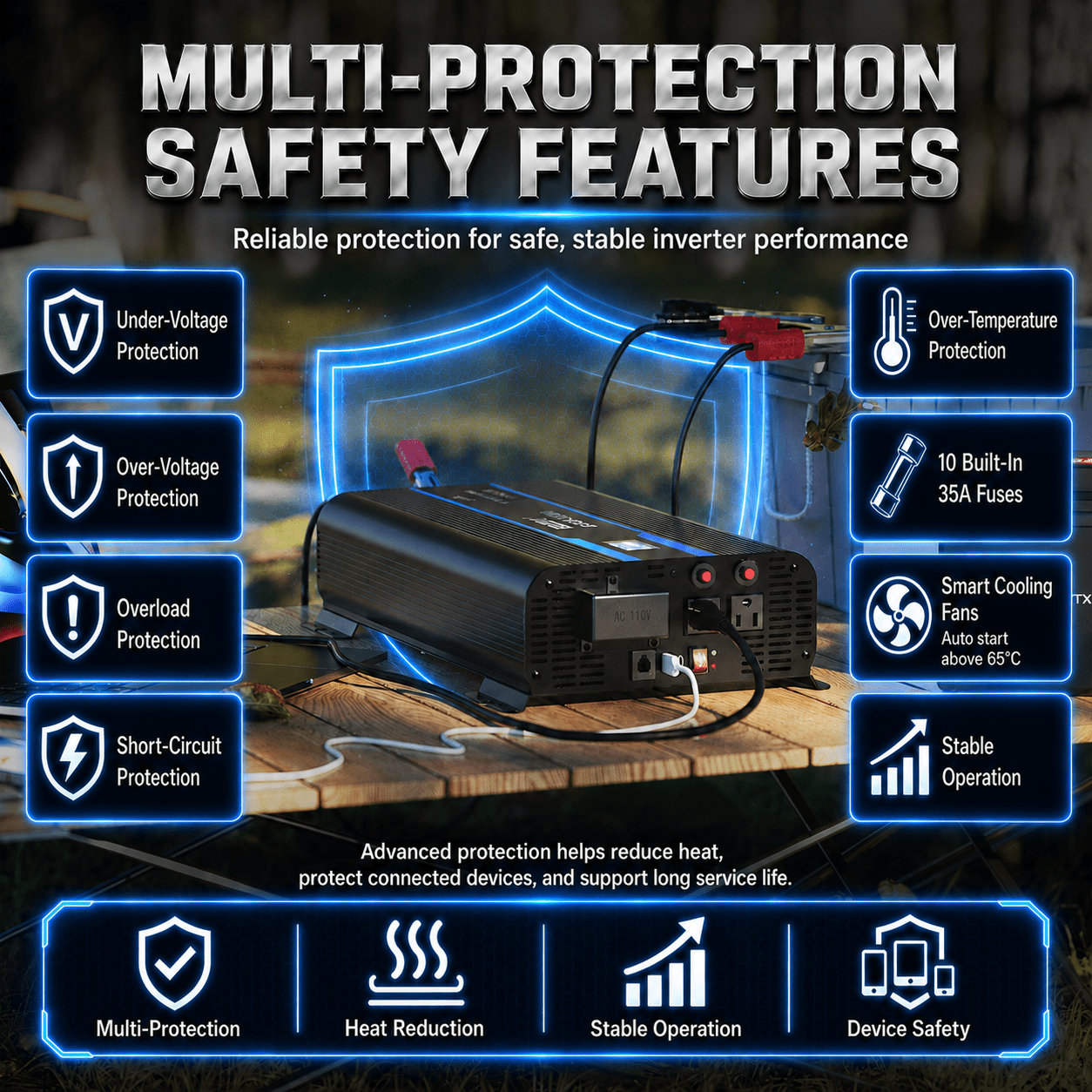
The DSU-3000 provides a low-voltage alarm at 10.5V ±0.3V and shuts down at 9.5V ±0.3V to help protect the connected 12V battery from excessive discharge.
2. Over-Voltage Protection
The inverter shuts down when input voltage reaches approximately 16V ±0.3V and can automatically resume operation when voltage returns to approximately 14V ±0.3V.
3. Overload Protection
Overload protection is designed to activate when output demand reaches approximately 3100–3400W. Reduce the connected load to within the rated power range before resuming operation.
4. Over-Temperature Protection
Over-temperature protection activates when the internal inverter temperature exceeds approximately 96°C, helping protect internal components from excessive heat.
5. Temperature-Controlled Dual-Fan Cooling
The DSU-3000 uses a dual-fan cooling layout with temperature-controlled operation. The cooling system begins operating at approximately 65°C to support stable thermal performance.
6. Output Short-Circuit Protection
The DSU-3000 includes output short-circuit protection. After correcting the wiring or connected-load fault, restart the inverter before continuing operation.
7. 10 × 35A Fuse Protection
The 12V DSU-3000 uses ten 35A fuses as part of its electrical protection system.
8. AC Outlet Reset Protection
The DSU-3000 includes AC outlet reset buttons that provide a convenient way to restore an affected outlet after an overload or short-circuit condition has been corrected.
9. LCD Fault-Code Monitoring
The LCD provides fault codes for low voltage, over voltage, over temperature, overload, and output short-circuit conditions, making abnormal operating conditions easier to identify.
10. Grounding Connection
A dedicated grounding connection is provided as part of the DSU-3000 installation system. Follow the user guide and applicable electrical requirements when grounding the inverter.
| Compatibility | Typical Equipment | Compatibility Details |
|---|---|---|
| 12V Battery Systems | Compatible 12V battery-powered systems | The 12V DSU-3000 operates within an 11–15V DC input range. Use an appropriately sized battery bank, high-quality copper wiring, correct polarity, and secure DC connections. |
| Sensitive Electronics | Computers, monitors, TVs, audio equipment, chargers, and compatible electronics | The DSU-3000 produces pure sine wave AC output with THD below 5% at normal load, making it suitable for many compatible electronic devices. Always verify device voltage and power requirements before use. |
| Laptops & Office Equipment | Laptops, monitors, printers, chargers, and compatible office equipment | Suitable when combined continuous power remains within the DSU-3000's 3000W rating and startup demand stays within available peak capacity. |
| Phones & USB Devices | Phones, tablets, cameras, and compatible USB-powered electronics | The DSU-3000 provides USB-A output at 5V / 2.1A and USB-C output up to 18W for compatible devices. |
| Small & Medium Appliances | Compatible household, travel, workshop, and mobile-use appliances | Appliances may be used when their running wattage and startup demand remain within the DSU-3000's 3000W continuous / 6000W peak output limits. |
| Power Tools | Compatible corded tools and tool-battery chargers | Check both continuous wattage and startup surge before use. Motor-driven tools may require substantially more power during startup. |
| Multiple Devices | Multiple AC and USB-powered devices operating together | Multiple compatible devices may be operated at the same time as long as their combined power consumption remains within the inverter's rated capacity. |
| High-Starting-Surge Loads | Compatible equipment with motors, compressors, or significant startup demand | The DSU-3000 provides up to 6000W peak power. Always verify the connected device's startup requirement before use. |
| Direct-Connect Applications | Compatible external AC output systems | The DSU-3000 includes a 110V direct-connect terminal. Wiring and over-current protection should follow the user guide and applicable electrical requirements. |
| Remote-Control Installations | Installations where the inverter is positioned away from the operator | The DSU-3000 supports an optional remote-control system through an RJ12 port with a 6 m cable. |
| High-Power Equipment | Compatible appliances, tools, and other higher-demand AC equipment | Use only when continuous demand remains within 3000W and startup demand remains within the DSU-3000's available peak capacity. |
Important Compatibility Note: The ERAYAK DSU-3000 provides up to 3000W continuous power / 6000W peak power from a compatible 12V DC battery system. It produces pure sine wave AC output with THD below 5% at normal load. Always verify connected-device voltage, running wattage, startup surge, battery capacity, cable requirements, and installation conditions before use.
Simple Care. Reliable Power.
Keeping your ERAYAK DSU-3000 in good operating condition mainly involves maintaining clear ventilation, keeping DC and AC connections secure, removing dust from the cooling system, monitoring operating conditions, and keeping liquids and conductive materials away from the inverter.
| Maintenance Item | When to Check | What to Do |
|---|---|---|
| Fan Vents | Regularly and before heavy use | Make sure all cooling-fan vents and ventilation openings are unobstructed. |
| Cooling Fan Area | As needed | Use a vacuum cleaner to remove accumulated dust from the fan area. |
| DC Input Terminals | Before use | Check that the positive (+) and negative (-) DC input terminal screws are firm and tight. |
| Battery Wiring | Before use and after installation changes | Inspect wiring for correct polarity, secure connections, adequate cable size, suitable cable length, and visible damage. |
| Connected Load | Before and during use | Keep total continuous power within 3000W. For longer inverter life, the user guide recommends normal load within approximately 85% of rated output. |
| AC Outlet Reset Buttons | After an outlet overload or short-circuit condition | Correct the connected-load or wiring issue before resetting the affected outlet. |
| Direct-Connect Terminal | Before use and after wiring service | Inspect the terminal connection and make sure wiring is secure and properly protected before operation. |
| LCD & Fault Codes | During use | Monitor input voltage, load power, output frequency, output current, battery power, and fault codes for abnormal operating conditions. |
| Exterior Cleaning | As needed | Use a soft, dry cloth. If heavily soiled, use a neutral, non-abrasive detergent. Do not use alcohol- or ammonia-based cleaning solutions. |
| Physical Condition | Before use | Inspect the housing, terminals, wiring, fan area, outlets, direct-connect terminal, and remote-control connection for visible damage or abnormal condition. |
Service Note: The DSU-3000 does not require engine-style scheduled maintenance. Regular inspection of the DC terminals, wiring, ventilation system, cooling fans, AC connections, connected load, and operating indicators is the primary maintenance requirement.
1. Cooling & Ventilation — Keep Airflow Clear
Make sure the front, rear, and bottom ventilation openings are not blocked. Install the DSU-3000 in a well-ventilated area so the cooling system can operate properly.
The mounting surface should be flat. An uneven mounting surface can affect cooling-fan heat dissipation.
2. Fan Area — Remove Dust Regularly
Check the cooling-fan area periodically for accumulated dust. Use a vacuum cleaner to remove dust from the fan and ventilation area without opening the inverter housing.
3. DC Connections — Keep Terminals Tight
Check that the screws on the positive (+) and negative (-) DC input terminals remain firm and tight. Loose DC connections can cause overheating and create a potential electrical or fire hazard.
Use high-quality copper wiring with an appropriate wire size and suitable cable length for the installation.
4. Load Management — Avoid Continuous Overloading
The DSU-3000 provides 3000W continuous power and up to 6000W peak power.
For longer inverter service life, the user guide recommends keeping normal connected load within approximately 85% of rated output power.
If overload protection activates, reduce the connected load to within the rated power range before restarting the inverter or allowing it to recover.
5. AC Outlet Reset Buttons — Correct the Fault First
The DSU-3000 includes AC outlet reset buttons. If an outlet protection condition occurs, disconnect or correct the affected load before resetting the outlet.
Do not repeatedly reset an outlet without identifying and correcting the overload, short circuit, or connected-device problem.
6. Direct-Connect Terminal — Inspect Wiring Carefully
The DSU-3000 includes a 110V direct-connect terminal. Make sure all AC wiring is properly installed, securely connected, and protected according to the user guide and applicable electrical requirements.
The user guide recommends adding an over-current protection device to the AC output circuit when required by the installation.
7. Temperature — Maintain Proper Operating Conditions
The user guide identifies -15°C to 25°C as the recommended working-temperature range. Operating outside this range may affect output efficiency.
The temperature-controlled cooling fans begin operating at approximately 65°C, while over-temperature protection activates when internal temperature exceeds approximately 96°C.
If an over-temperature shutdown occurs, stop using the inverter and allow it to cool before resuming operation.
8. LCD Fault Codes — Check Before Restarting
- E0: Low Voltage
- E1: Over Voltage
- E2: Over Temperature
- E3: Overload
- E4: Output Short Circuit
Identify and correct the cause of the fault before restarting the inverter.
9. Cleaning — Use the Correct Materials
Use a soft, dry cloth to clean the inverter housing and front panel. If the surface is heavily soiled, use a neutral and non-abrasive detergent.
Do not use alcohol- or ammonia-based cleaning solutions, and prevent liquids or metal objects from entering the inverter.
10. Service & Repair — Do Not Disassemble
Do not open or disassemble the DSU-3000. Attempting internal repair may damage the inverter and can create a risk of electric shock or fire.
If internal service is required, contact ERAYAK Support or qualified professional service personnel.
Important Reminder: Keep the DSU-3000 well ventilated, maintain firm DC connections, use appropriately sized high-quality copper wiring, keep normal load within the recommended operating range, remove dust from the fan area when needed, inspect the direct-connect and AC outlet systems, keep liquids and metal objects away from the inverter, and never open or disassemble the unit for routine maintenance.
- 【POTENTE CC a CA】100 W máx. continuo, sobretensión máxima de 2000 W durante el arranque con carga en frío, onda sinusoidal pura de 12 V a 120 VCA.
- 【SEGURO DE USO】Pantalla LCD incorporada para estimación de carga, monitor de capacidad/voltaje de la batería y código de solución de problemas. Indicador LED para protección contra bajo/sobrevoltaje, protección contra sobretemperatura, protección contra sobrecarga e indicación de cortocircuito. Ventiladores de refrigeración y protección del interruptor de circuito de falla a tierra (GFCI).
- 【PROTEJA SUS ELECTRÓNICAS】El avanzado inversor de onda sinusoidal pura de Erayak proporciona CA de calidad equivalente a la energía de la red, lo que protegerá y extenderá la vida útil de sus dispositivos electrónicos y electrodomésticos. Con sus cargas inductivas altas y silenciosas, no se producen zumbidos extraños cuando se encienden los componentes electrónicos inductivos y les permite funcionar de manera más suave, fría y silenciosa.
- 【FÁCIL DE USAR】 Ofrece un puerto tipo C y un puerto USB de 5 V/2,1 A, 3 salidas de CA y 1 bloque de terminales de CA, junto con dos cables 4 AWG de 1,6 pies y un control remoto con cable de 2 pies.
| Modelo | 110V |
220V |
| Energía continua | 1000W | |
| Potencia máxima | 2000W | |
| Tensión de salida sin carga (@ tensión de entrada nominal) |
CA 230 V +/- 10 V, CA 110 V +/- 10 V | |
| Voltaje de salida de carga (@ voltaje de entrada nominal) |
CA 210 V -240 V, CA 110 V +/- 10 V | |
| Frecuencia | 50 Hz +/- 0,5 Hz, 60 Hz +/- 0,5 Hz | |
| Salida USB (tipo A o C opcional) | Tipo A (CC 5 V, 2100 mA), Tipo C (18 W máx.) | |
| Onda de salida | Onda sinusoidal pura (THD < 5% @ carga normal) | |
| Tensión de entrada nominal | CC 13 V +/- 0,2 V | CC 26 V +/- 0,4 V |
| Rango de voltaje de funcionamiento | CC 11 V - 15 V | CC 22 V - 30 V |
| Sin corriente de carga | ≤1.0A | ≤0,6A |
| Máx. eficiencia | ≥85% | |
| Entrada de alarma de bajo voltaje | CC 10,5 V +/- 0,3 V | CC 21 V +/- 0,4 V |
| Protección de bajo voltaje de entrada | CC 9,5 V +/- 0,3 V | CC 19 V +/- 0,4 V |
| Protección contra sobretensión de entrada | CC 16 V +/- 0,3 V | CC 32 V +/- 0,4 V |
| Protección contra sobrecarga | 1100W - 1250W | |
| Sobretemperatura. protección | Sí, salida de apagado | |
| Protección contra cortocircuitos de salida | Sí, salida de apagado | |
| Polaridad inversa de entrada CC | Sí, por fusible | |
| Temperatura de funcionamiento. | -15°C ~ +25°C; 60°C @ 40% de carga de energía | |
| Temperatura de almacenamiento. y humedad | -30°C ~ +70°C, 10 ~ 95% de humedad relativa | |
| Dimensión (largo x ancho x profundidad) | 384*210*102 mm | |
| Embalaje | caja, 3 piezas/caja, 46*45*28,5 cm | |
| Aplicación | Electrodomésticos para el hogar y la oficina, equipos de energía portátiles, vehículos, yates y sistemas de energía solar fuera de la red...etc. | |
| Tipo de enchufe | Europeo/Francia/Italiano/Reino Unido/Australia/Americano/Universal/Sudafricano/Brasileño, etc. | |
| Warranty & Support | Coverage Details |
|---|---|
| Warranty Duration | 1-Year Limited Warranty for eligible ERAYAK DSU-3000 purchases, subject to applicable warranty terms, proof of purchase, product condition, and technical verification. |
| Warranty Coverage | Coverage applies to eligible manufacturing defects and product malfunctions that occur under normal use during the applicable warranty period. |
| Technical Diagnosis | ERAYAK Technical Support may assist with troubleshooting low-voltage alarm or shutdown, input over-voltage shutdown, overload shutdown, over-temperature shutdown, output short circuit, fuse failure, cooling-fan issues, LCD fault codes, AC outlet reset issues, remote-control issues, and DC battery-connection problems before confirming the appropriate warranty solution. |
| Replacement Parts Support | For eligible warranty issues, ERAYAK may provide applicable replacement parts, troubleshooting assistance, or other appropriate service solutions after technical verification and warranty review. |
| Fuse Support | The 12V DSU-3000 uses 10 × 35A fuses. ERAYAK Support can assist with fuse identification, replacement guidance, and troubleshooting when a fuse-related issue occurs. |
| Battery Connection Support | Support is available for the positive (+) and negative (-) DC input terminals, battery wiring, correct polarity, cable sizing, and related input-power troubleshooting. |
| LCD & Fault-Code Support | ERAYAK Support can assist with interpreting LCD information and fault codes including low voltage, over voltage, over temperature, overload, and output short-circuit conditions. |
| AC Outlet Reset Support | The DSU-3000 includes AC outlet reset buttons. ERAYAK Support can assist with outlet-reset procedures and related overload or short-circuit troubleshooting. |
| Remote Control Support | The DSU-3000 supports an optional remote-control system through an RJ12 port. ERAYAK Support can assist with compatible remote-control setup and operating questions. |
| Direct-Connect Terminal Support | The DSU-3000 includes a 110V direct-connect terminal. Connection and service should follow the DSU-3000 user guide and applicable electrical requirements. |
| Technical Support | ERAYAK provides assistance with product setup, 12V battery connection, load planning, pure sine wave operation, LCD monitoring, remote-control operation, outlet reset procedures, fault diagnosis, cooling and ventilation, and after-sales support for the DSU-3000. |
| Email Support | support@erayakpower.com Customers may submit proof of purchase, order information, photos, videos, battery information, LCD fault codes, and a description of the issue for technical review. |
| English Phone Support | +1 (573) 455-4565 English-speaking support is available for setup, troubleshooting, warranty questions, replacement-part assistance, and after-sales service. |
| WhatsApp Support | +1 (573) 455-4565 Contact ERAYAK via WhatsApp for convenient technical and after-sales assistance. |
| Warranty Claim Process | Contact ERAYAK Support with your proof of purchase, product model, order information, and a description of the issue. Photos, videos, battery information, connected-device details, LCD fault codes, installation information, or troubleshooting results may be requested before the appropriate warranty solution is confirmed. |
| Service & Repair | Do not open or disassemble the inverter. Unauthorized internal service may damage the product and may affect warranty eligibility. If internal repair is required, contact ERAYAK Support or qualified service personnel. |
Warranty Note: Warranty service is subject to the applicable ERAYAK warranty terms, proof of purchase, proper installation and operation, technical verification, and applicable exclusions. Incorrect polarity, improper wiring, excessive load, blocked ventilation, improper direct-connect wiring, moisture exposure, unauthorized disassembly or repair, physical damage, or operation outside the DSU-3000 user guide may affect warranty eligibility.
| U.S. Shipping | Details |
|---|---|
| U.S. Warehouses | ERAYAK provides local U.S. fulfillment from warehouses in California, New Jersey, and Georgia. |
| Order Processing | Most orders are confirmed and prepared for shipment within 24 hours after order verification. |
| Tracking Number | A tracking number is provided after the order is shipped so customers can follow the delivery status online. |
| Standard Delivery | Most standard orders are estimated to arrive within 2–4 business days after shipment. |
| Expedited Processing | Expedited service is available for eligible orders. Expedited orders receive priority order confirmation, faster warehouse processing, and priority logistics handling. |
| 2-Business-Day Delivery Option | A 2-business-day delivery option may be available for eligible products and destinations. Availability and any additional shipping charges should be confirmed before ordering. |
| Shipping Coverage | Delivery is available across most locations within the contiguous United States. |
| Hawaii & Offshore Areas | For Hawaii, U.S. islands, offshore territories, or other locations outside the contiguous United States, please contact ERAYAK Support before placing your order to confirm shipping availability and cost. |
| Warehouse Assignment | Orders are fulfilled from the most suitable U.S. warehouse based on product availability and the customer's delivery location. |
| Shipping Support | Email: support@erayakpower.com Phone: +1 (573) 455-4565 WhatsApp: +1 (573) 455-4565 |
Shipping Note: Delivery times are estimates and may vary based on inventory availability, destination, carrier conditions, weather, holidays, and other logistics factors. For urgent, remote-area, or special delivery requests, contact ERAYAK Support before placing your order.
| Specification | Details |
|---|---|
| Model | ERAYAK DSU-3000 |
| Product Type | 3000W Pure Sine Wave Power Inverter |
| Continuous Power | 3000W |
| Peak Power | 6000W |
| Rated Input Voltage | DC 13V for 12V Inverter |
| Operating Input Voltage Range | DC 11–15V |
| No-Load Output Voltage | AC 115V ±10V |
| Load Output Voltage | AC 115V ±10V |
| Output Frequency | 60Hz ±0.5Hz |
| Output Waveform | Pure Sine Wave |
| Total Harmonic Distortion | THD <5% at Normal Load |
| Maximum Efficiency | ≥85% |
| No-Load Current | ≤2.0A DC at 12V Input |
| AC Outlets | 3 AC Outlets Shown in the DSU-3000 Structural Drawing; Socket Type Depends on Actual Product Configuration |
| 110V Direct-Connect Terminal | Yes |
| AC Outlet Reset Buttons | Yes |
| USB-A Output | DC 5V / 2100mA |
| USB-C Output | 18W Max. |
| LCD Display | Input Voltage, Load Power, Output Frequency, Output Current, Battery Power, and Fault Code |
| Fault Codes | E0: Low Voltage / E1: Over Voltage / E2: Over Temperature / E3: Overload / E4: Output Short Circuit |
| Input Low-Voltage Alarm | DC 10.5V ±0.3V |
| Input Low-Voltage Shutdown | DC 9.5V ±0.3V |
| Low-Voltage Recovery | Automatically Resumes at DC 12V ±0.3V |
| Input Over-Voltage Shutdown | DC 16V ±0.3V |
| Over-Voltage Recovery | Automatically Resumes at DC 14V ±0.3V |
| Overload Protection | Yes — Approximately 3100–3400W |
| Overload Recovery | Reduce Load to the Rated Range and Restart the Inverter; Automatic Recovery May Also Occur After the Specified Recovery Period |
| Over-Temperature Protection | Yes — Protection Starts Above 96°C |
| Output Short-Circuit Protection | Yes |
| Reverse-Polarity Protection | Fuse-Based Protection; Correct Battery Polarity Is Required |
| Cooling Method | Temperature-Controlled Fan System; Fan Starts at Approximately 65°C |
| Cooling Layout | Dual-Fan Rear Cooling Layout |
| Fuse Configuration | 10 × 35A for 12V DSU-3000 |
| Remote Control | Optional — RJ12 Port with 6 m Cable |
| Grounding Connection | Yes |
| Recommended Working Temperature | -15°C to 25°C |
| Recommended Long-Life Load | Within 85% of Rated Output Power |
| Approximate Overall Dimensions | 467.5 × 250 × 100 mm / 18.41 × 9.84 × 3.94 in |
Performance Note: Actual inverter performance depends on battery condition, input voltage, cable size and length, connected load, startup demand, ambient temperature, ventilation, and installation conditions. For longer inverter service life, the user guide recommends keeping normal load within approximately 85% of rated output power.
1. 3000W Continuous Power
The DSU-3000 provides up to 3000W of continuous AC output and 6000W peak power for compatible 12V battery-powered applications.
2. Maximum Efficiency ≥85%
The DSU-3000 is rated for a maximum conversion efficiency of at least 85% under applicable operating conditions, helping convert available DC battery power into usable AC power.
3. Pure Sine Wave Output
Pure sine wave output with THD below 5% at normal load provides a cleaner AC waveform for compatible electronics, appliances, and other AC-powered equipment.
4. Smart Load Planning
For longer inverter service life, the user guide recommends keeping normal connected load within approximately 85% of the DSU-3000's rated 3000W output.
5. Temperature-Controlled Cooling
The cooling fans are temperature controlled and begin operating at approximately 65°C, helping provide additional cooling when internal temperature rises.
6. Real-Time Power Monitoring
The LCD display provides input voltage, load power, output frequency, output current, battery power, and fault-code information to help users monitor system conditions during operation.
7. Low-Voltage Battery Protection
The 12V DSU-3000 provides a low-voltage alarm at approximately 10.5V and shuts down at approximately 9.5V, helping reduce excessive battery discharge.
1. Low-Voltage Protection
The DSU-3000 provides a low-voltage alarm at 10.5V ±0.3V and shuts down at 9.5V ±0.3V to help protect the connected 12V battery from excessive discharge.
2. Over-Voltage Protection
The inverter shuts down when input voltage reaches approximately 16V ±0.3V and can automatically resume operation when voltage returns to approximately 14V ±0.3V.
3. Overload Protection
Overload protection is designed to activate when output demand reaches approximately 3100–3400W. Reduce the connected load to within the rated power range before resuming operation.
4. Over-Temperature Protection
Over-temperature protection activates when the internal inverter temperature exceeds approximately 96°C, helping protect internal components from excessive heat.
5. Temperature-Controlled Dual-Fan Cooling
The DSU-3000 uses a dual-fan cooling layout with temperature-controlled operation. The cooling system begins operating at approximately 65°C to support stable thermal performance.
6. Output Short-Circuit Protection
The DSU-3000 includes output short-circuit protection. After correcting the wiring or connected-load fault, restart the inverter before continuing operation.
7. 10 × 35A Fuse Protection
The 12V DSU-3000 uses ten 35A fuses as part of its electrical protection system.
8. AC Outlet Reset Protection
The DSU-3000 includes AC outlet reset buttons that provide a convenient way to restore an affected outlet after an overload or short-circuit condition has been corrected.
9. LCD Fault-Code Monitoring
The LCD provides fault codes for low voltage, over voltage, over temperature, overload, and output short-circuit conditions, making abnormal operating conditions easier to identify.
10. Grounding Connection
A dedicated grounding connection is provided as part of the DSU-3000 installation system. Follow the user guide and applicable electrical requirements when grounding the inverter.
| Compatibility | Typical Equipment | Compatibility Details |
|---|---|---|
| 12V Battery Systems | Compatible 12V battery-powered systems | The 12V DSU-3000 operates within an 11–15V DC input range. Use an appropriately sized battery bank, high-quality copper wiring, correct polarity, and secure DC connections. |
| Sensitive Electronics | Computers, monitors, TVs, audio equipment, chargers, and compatible electronics | The DSU-3000 produces pure sine wave AC output with THD below 5% at normal load, making it suitable for many compatible electronic devices. Always verify device voltage and power requirements before use. |
| Laptops & Office Equipment | Laptops, monitors, printers, chargers, and compatible office equipment | Suitable when combined continuous power remains within the DSU-3000's 3000W rating and startup demand stays within available peak capacity. |
| Phones & USB Devices | Phones, tablets, cameras, and compatible USB-powered electronics | The DSU-3000 provides USB-A output at 5V / 2.1A and USB-C output up to 18W for compatible devices. |
| Small & Medium Appliances | Compatible household, travel, workshop, and mobile-use appliances | Appliances may be used when their running wattage and startup demand remain within the DSU-3000's 3000W continuous / 6000W peak output limits. |
| Power Tools | Compatible corded tools and tool-battery chargers | Check both continuous wattage and startup surge before use. Motor-driven tools may require substantially more power during startup. |
| Multiple Devices | Multiple AC and USB-powered devices operating together | Multiple compatible devices may be operated at the same time as long as their combined power consumption remains within the inverter's rated capacity. |
| High-Starting-Surge Loads | Compatible equipment with motors, compressors, or significant startup demand | The DSU-3000 provides up to 6000W peak power. Always verify the connected device's startup requirement before use. |
| Direct-Connect Applications | Compatible external AC output systems | The DSU-3000 includes a 110V direct-connect terminal. Wiring and over-current protection should follow the user guide and applicable electrical requirements. |
| Remote-Control Installations | Installations where the inverter is positioned away from the operator | The DSU-3000 supports an optional remote-control system through an RJ12 port with a 6 m cable. |
| High-Power Equipment | Compatible appliances, tools, and other higher-demand AC equipment | Use only when continuous demand remains within 3000W and startup demand remains within the DSU-3000's available peak capacity. |
Important Compatibility Note: The ERAYAK DSU-3000 provides up to 3000W continuous power / 6000W peak power from a compatible 12V DC battery system. It produces pure sine wave AC output with THD below 5% at normal load. Always verify connected-device voltage, running wattage, startup surge, battery capacity, cable requirements, and installation conditions before use.
Simple Care. Reliable Power.
Keeping your ERAYAK DSU-3000 in good operating condition mainly involves maintaining clear ventilation, keeping DC and AC connections secure, removing dust from the cooling system, monitoring operating conditions, and keeping liquids and conductive materials away from the inverter.
| Maintenance Item | When to Check | What to Do |
|---|---|---|
| Fan Vents | Regularly and before heavy use | Make sure all cooling-fan vents and ventilation openings are unobstructed. |
| Cooling Fan Area | As needed | Use a vacuum cleaner to remove accumulated dust from the fan area. |
| DC Input Terminals | Before use | Check that the positive (+) and negative (-) DC input terminal screws are firm and tight. |
| Battery Wiring | Before use and after installation changes | Inspect wiring for correct polarity, secure connections, adequate cable size, suitable cable length, and visible damage. |
| Connected Load | Before and during use | Keep total continuous power within 3000W. For longer inverter life, the user guide recommends normal load within approximately 85% of rated output. |
| AC Outlet Reset Buttons | After an outlet overload or short-circuit condition | Correct the connected-load or wiring issue before resetting the affected outlet. |
| Direct-Connect Terminal | Before use and after wiring service | Inspect the terminal connection and make sure wiring is secure and properly protected before operation. |
| LCD & Fault Codes | During use | Monitor input voltage, load power, output frequency, output current, battery power, and fault codes for abnormal operating conditions. |
| Exterior Cleaning | As needed | Use a soft, dry cloth. If heavily soiled, use a neutral, non-abrasive detergent. Do not use alcohol- or ammonia-based cleaning solutions. |
| Physical Condition | Before use | Inspect the housing, terminals, wiring, fan area, outlets, direct-connect terminal, and remote-control connection for visible damage or abnormal condition. |
Service Note: The DSU-3000 does not require engine-style scheduled maintenance. Regular inspection of the DC terminals, wiring, ventilation system, cooling fans, AC connections, connected load, and operating indicators is the primary maintenance requirement.
1. Cooling & Ventilation — Keep Airflow Clear
Make sure the front, rear, and bottom ventilation openings are not blocked. Install the DSU-3000 in a well-ventilated area so the cooling system can operate properly.
The mounting surface should be flat. An uneven mounting surface can affect cooling-fan heat dissipation.
2. Fan Area — Remove Dust Regularly
Check the cooling-fan area periodically for accumulated dust. Use a vacuum cleaner to remove dust from the fan and ventilation area without opening the inverter housing.
3. DC Connections — Keep Terminals Tight
Check that the screws on the positive (+) and negative (-) DC input terminals remain firm and tight. Loose DC connections can cause overheating and create a potential electrical or fire hazard.
Use high-quality copper wiring with an appropriate wire size and suitable cable length for the installation.
4. Load Management — Avoid Continuous Overloading
The DSU-3000 provides 3000W continuous power and up to 6000W peak power.
For longer inverter service life, the user guide recommends keeping normal connected load within approximately 85% of rated output power.
If overload protection activates, reduce the connected load to within the rated power range before restarting the inverter or allowing it to recover.
5. AC Outlet Reset Buttons — Correct the Fault First
The DSU-3000 includes AC outlet reset buttons. If an outlet protection condition occurs, disconnect or correct the affected load before resetting the outlet.
Do not repeatedly reset an outlet without identifying and correcting the overload, short circuit, or connected-device problem.
6. Direct-Connect Terminal — Inspect Wiring Carefully
The DSU-3000 includes a 110V direct-connect terminal. Make sure all AC wiring is properly installed, securely connected, and protected according to the user guide and applicable electrical requirements.
The user guide recommends adding an over-current protection device to the AC output circuit when required by the installation.
7. Temperature — Maintain Proper Operating Conditions
The user guide identifies -15°C to 25°C as the recommended working-temperature range. Operating outside this range may affect output efficiency.
The temperature-controlled cooling fans begin operating at approximately 65°C, while over-temperature protection activates when internal temperature exceeds approximately 96°C.
If an over-temperature shutdown occurs, stop using the inverter and allow it to cool before resuming operation.
8. LCD Fault Codes — Check Before Restarting
- E0: Low Voltage
- E1: Over Voltage
- E2: Over Temperature
- E3: Overload
- E4: Output Short Circuit
Identify and correct the cause of the fault before restarting the inverter.
9. Cleaning — Use the Correct Materials
Use a soft, dry cloth to clean the inverter housing and front panel. If the surface is heavily soiled, use a neutral and non-abrasive detergent.
Do not use alcohol- or ammonia-based cleaning solutions, and prevent liquids or metal objects from entering the inverter.
10. Service & Repair — Do Not Disassemble
Do not open or disassemble the DSU-3000. Attempting internal repair may damage the inverter and can create a risk of electric shock or fire.
If internal service is required, contact ERAYAK Support or qualified professional service personnel.
Important Reminder: Keep the DSU-3000 well ventilated, maintain firm DC connections, use appropriately sized high-quality copper wiring, keep normal load within the recommended operating range, remove dust from the fan area when needed, inspect the direct-connect and AC outlet systems, keep liquids and metal objects away from the inverter, and never open or disassemble the unit for routine maintenance.
Frequently asked questions
-
What devices can I power with the ERAYAK DSU-3000 Power Inverter?
The DSU-3000 can power many compatible electronics, appliances, chargers, office equipment, and power tools as long as the combined continuous load remains within 3000W and startup demand stays within the inverter’s 6000W peak capacity. Always check each device’s running wattage and startup requirements before use.
-
How much power does the ERAYAK DSU-3000 provide?
The DSU-3000 provides up to 3000W continuous power and 6000W peak power, allowing it to support compatible devices with higher startup demand.
-
Does the DSU-3000 provide pure sine wave power?
Yes. The DSU-3000 produces Pure Sine Wave AC output with THD below 5% at normal load, providing a clean waveform for many compatible electronics and appliances.
-
What type of battery system should I use with the 12V DSU-3000?
The 12V DSU-3000 is designed for a compatible 12V DC battery system. Its operating input range is approximately 11–15V DC. Use correct battery polarity, appropriately sized copper wiring, and secure DC connections.
-
What does the LCD display show?
The LCD can display input voltage, load power, output frequency, output current, battery power, and fault codes, helping you monitor inverter and battery conditions during operation.
-
What do the DSU-3000 LCD fault codes mean?
The LCD uses the following fault codes: E0 – Low Voltage, E1 – Over Voltage, E2 – Over Temperature, E3 – Overload, and E4 – Output Short Circuit. Correct the cause of the fault before restarting the inverter.
-
Does the DSU-3000 support remote control?
Yes. The DSU-3000 supports an optional remote-control system through an RJ12 port with a 6 m cable, allowing the inverter to be controlled from a more convenient location when installed away from the operator.
-
What is the 110V direct-connect terminal used for?
The DSU-3000 includes a 110V direct-connect terminal for compatible external AC output applications. Installation should follow the user guide and applicable electrical requirements, with secure Line, Neutral, and Ground connections.
-
What are the AC outlet reset buttons used for?
The DSU-3000 includes AC outlet reset buttons that act as protection for the affected outlet. If an overload or short circuit occurs, correct the problem first, then reset the outlet before continuing use.
-
How efficient is the DSU-3000?
The user guide specifies a maximum efficiency of at least 85%. Actual efficiency can vary with battery condition, input voltage, load level, wiring, temperature, and installation conditions.
-
What happens if the battery voltage becomes too low or too high?
For the 12V version, the low-voltage alarm activates at approximately 10.5V ±0.3V, and shutdown occurs at approximately 9.5V ±0.3V. The inverter also shuts down at approximately 16V ±0.3V input over-voltage.
-
What should I do if the DSU-3000 is overloaded?
The DSU-3000’s overload protection is designed to activate at approximately 3100–3400W. Reduce the connected load to within the inverter’s rated range before restarting or allowing the system to recover.
-
How does the DSU-3000 cooling system work?
The DSU-3000 uses a dual-fan, temperature-controlled cooling system. The fans begin operating at approximately 65°C, helping manage heat when internal temperature rises. Keep all ventilation openings clear during use.
-
What should I do if the DSU-3000 overheats?
Stop or reduce the connected load and allow the inverter to cool. Make sure the cooling fans and ventilation openings are not blocked. Over-temperature protection activates when internal temperature exceeds approximately 96°C.
-
What fuse configuration does the 12V DSU-3000 use?
The 12V DSU-3000 uses 10 × 35A fuses as part of its protection system. Always disconnect the inverter from the battery before inspecting fuse-related issues, and use the correct fuse specification when replacement is required.
Customers praised this pure sine wave inverter for powering appliances like fridges, microwaves, and AC units reliably. "This powerhouse is keeping a fridge, 57" TV, microwave...running around the clock without a hitch." Shoppers noted exceptional customer service. Some mentioned calibration issues and that included cables are undersized for optimal performance.
- This powerhouse is keeping a fridge, 57" TV, microwave, Keurig running around the clock without a hitch
- It works flawlessly and I couldn't be happier with it
- Creates high quality power with a stable frequency. No frequency and voltage fluctuations
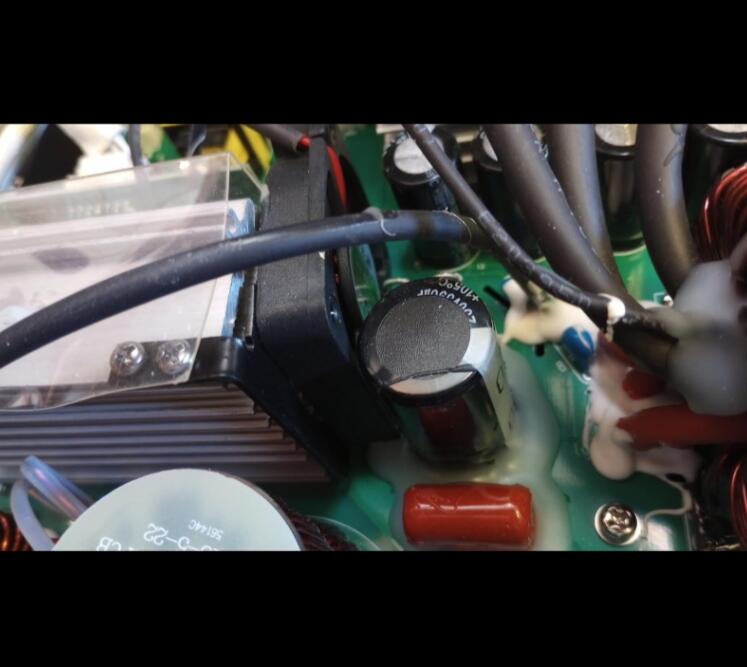
I bought two 3000w inverters with my own money. Admittedly, I destroyed them both due to storing them inside an enclosed space - perhaps even some other factors I created as well. The inverter(s) worked well and came highly recommended by YouTube sensations John "The Headsamsher" Daniels and his daughter, Keira. Their wild video put this product through rigorous paces and it passed all tests of what was thrown at it. their video was convincing enough; proof enough, to buy the Erayak inverter - twice. After blowing the internal capacitors (28 total between two inverters), I decided to reach out to the company for advice on where to find the correct capacitors for a replacement. Erayak's customer service team were sympathetic to my plight - so much so, they recommended that i toss the purchased two units and at their own business expense, send me a new one the next day. They even paid for the shipping and handling costs. I paid NOTHING! I am here now to pay my well-warranted gratitude. Erayak showed more concern for me and my safety above their bottom line. I now have the new unit and am having it installed inside a better, well-ventilated location in my RV. Thank you Erayak, for you never even publicized that, why, or how, you helped me. You just quietly did a good deed. John "The Headsmasher" Daniels, if you're reading this five-star review, you were right about this company. they do care. they do listen when their customer speaks! Buy quality products made by Erayak. You'll be glad you did.
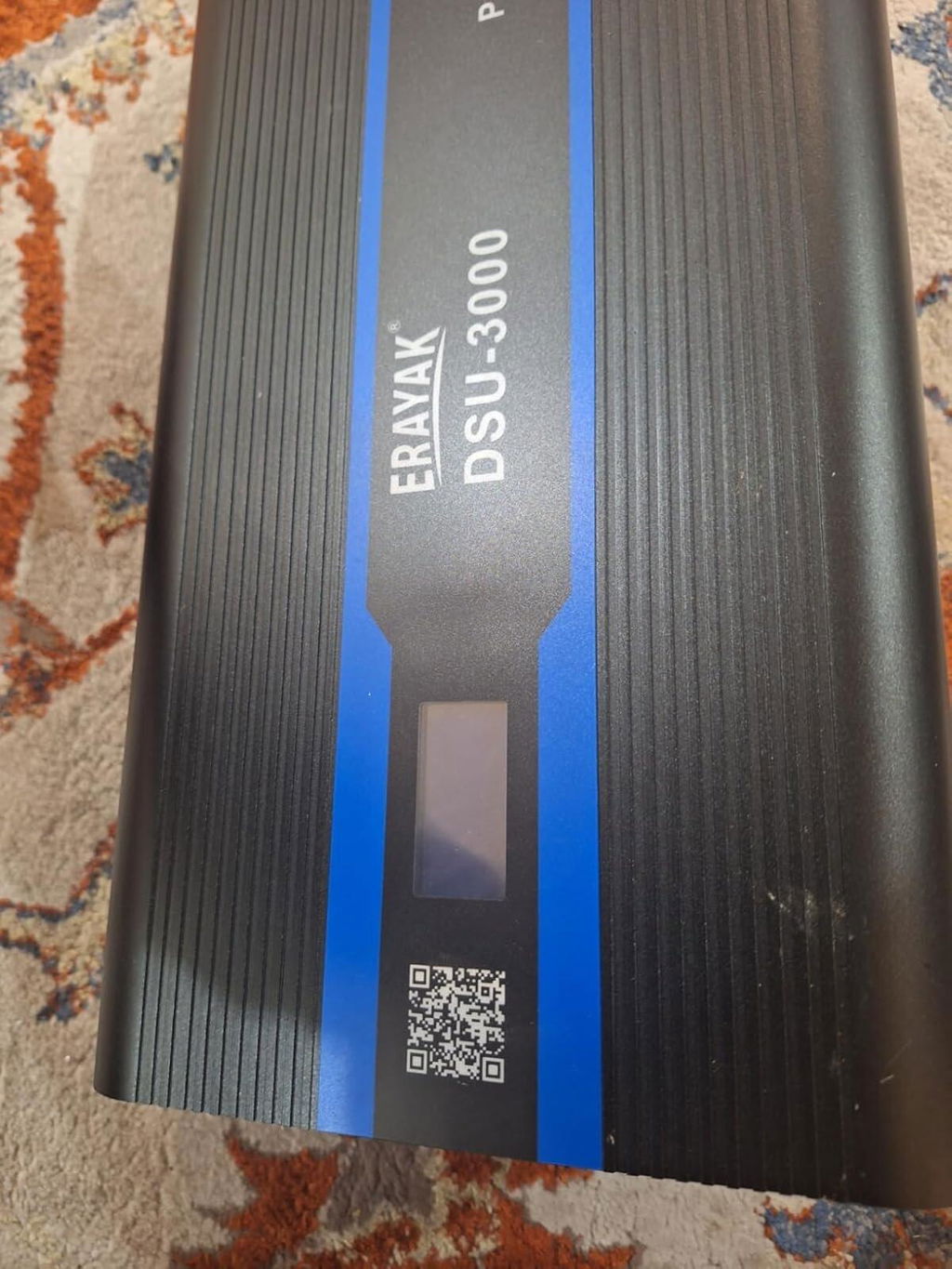
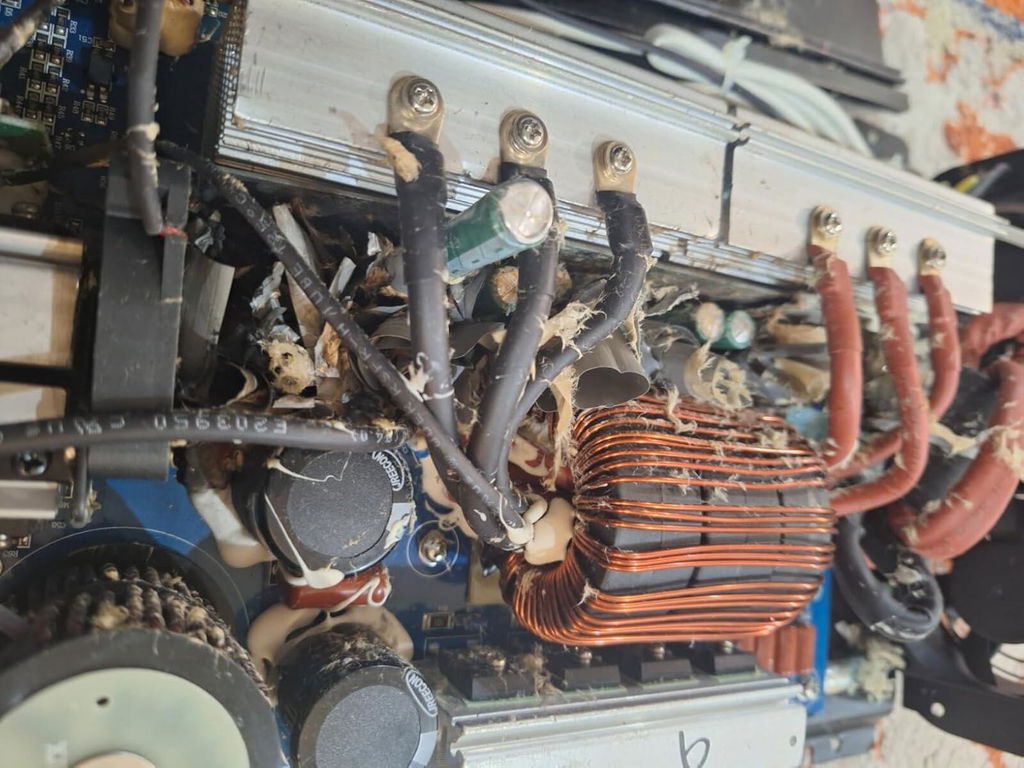
I am proud to say that I purchased the DSU-3000 Pure Sine Wave inverter based on the highest recommendation by John "The Headsmasher" Daniels and daughter, Keira. That YouTube electronics sensation duo really put this model through its paces, and the equipment never failed to amaze them, or fail in any respect for that matter. John also said that Erayak is a company that listens to their customers when a good suggestion is made. I personally now know how true John words are. I foolishly destroyed not one, but two of these inverters, by not knowing how to best wire them. I blew up two sets of internal capacitors - perhaps due to having the inverter inside a space that was not ventilated well enough. In any case, I wrote to the company, explained my failure and honestly owned up to my misuse of their product. they not only commended me for telling the truth, patiently giving me electronics advice, then offering to send me a replacement unit at their expense - including shipping! Who does that in this economy?! Not only are the products top-notch, but so is their customer support team. My negligence destroyed two masterpieces! Yet, above their merchandise and reputation, Erayak showed concern for my dream and most importantly, my life! Then they went and sent me a replacement to show support. Thank you, Erayak! I will be forever grateful to you.
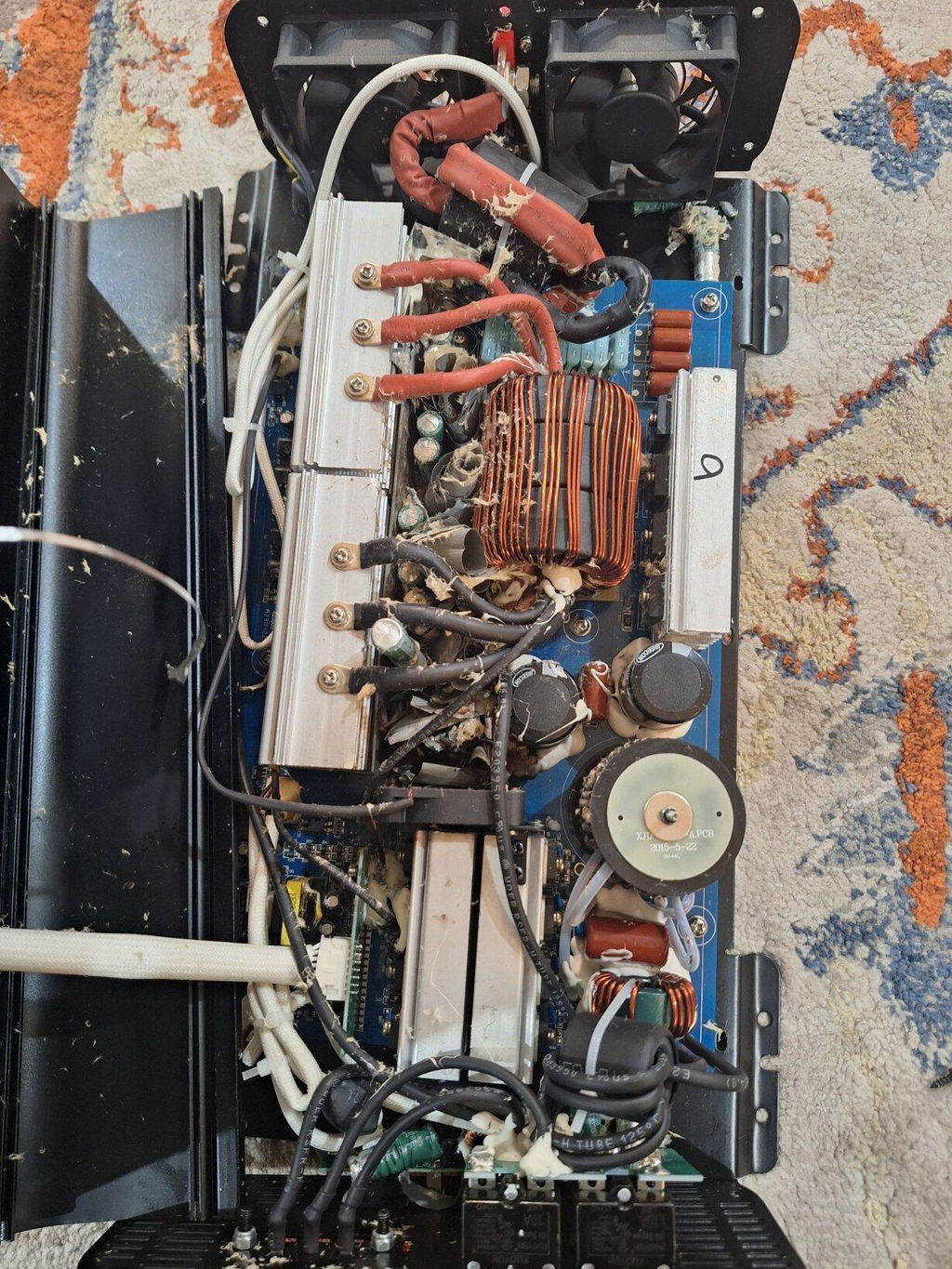
This is a well made inverter. It is a high frequency inverter that uses only one large High frequency Toroidal transformer for stepping up the 12V dc to 170V dc for feeding the DC to AC inverter output stage, most high frequency inverter uses multiple small transformers instead.
This unit can easily start and run my 1996 25 cu.ft Whirlpool without hesitation, I this fridge for testing inverter surge capability, it has at least 3600W of power surge which most of the 2000W inverters that I have tested fail to start and run this fridge. 2000W AIMS and BougRV can run my fridge OK, but other brands have failed to do so.
Now the bad part:
The Voltmeter calibration is way off, it shows 115V ac on the display but my Fluke and Kill-A-Watt meter show 120V ac, this is will also cause the Watt display to be off also.
The cables that come with the unit are too small, you should use 2/0 wire gauge for this unit for the DC input wires. 2000W AC output/12V = 167A, 167A/0.85 = 196A on the DC input side due to 85% inverter efficiency.
According to the tech support, you cannot bond Neutral and Ground together otherwise it will damage the unit.
It only has 2 AC outlets.
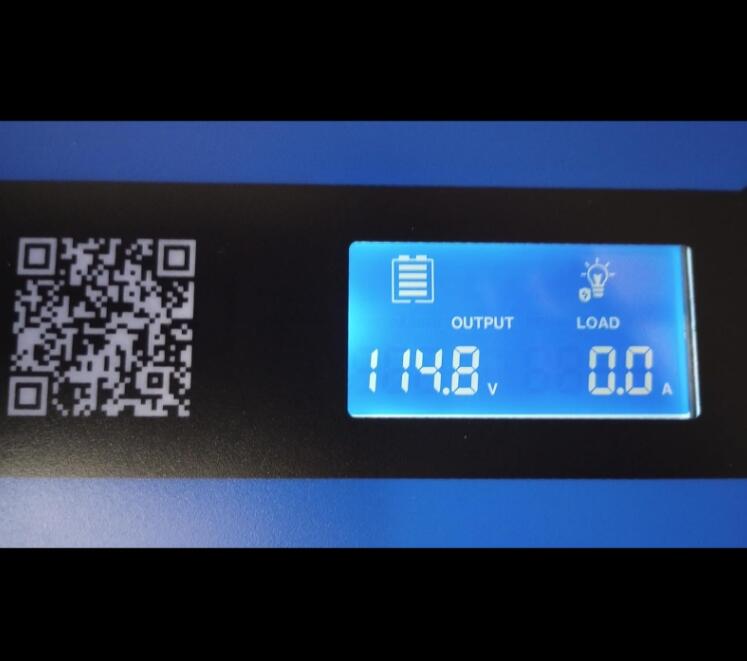
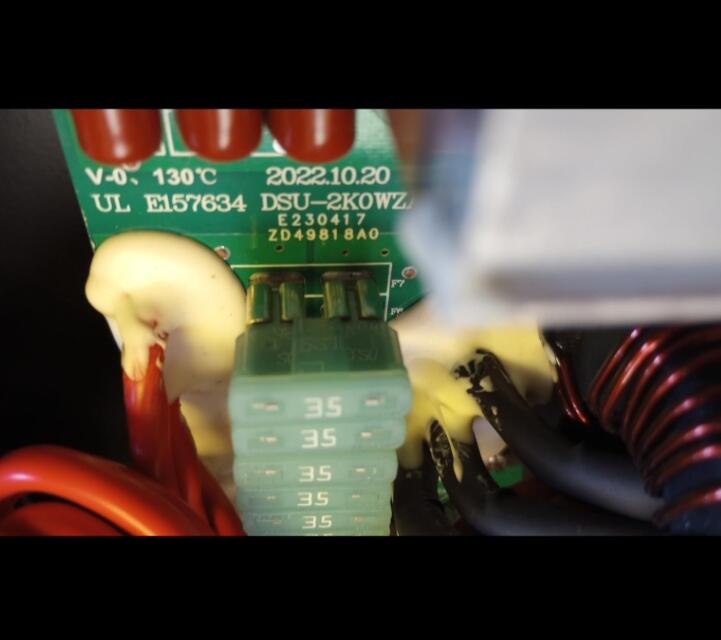
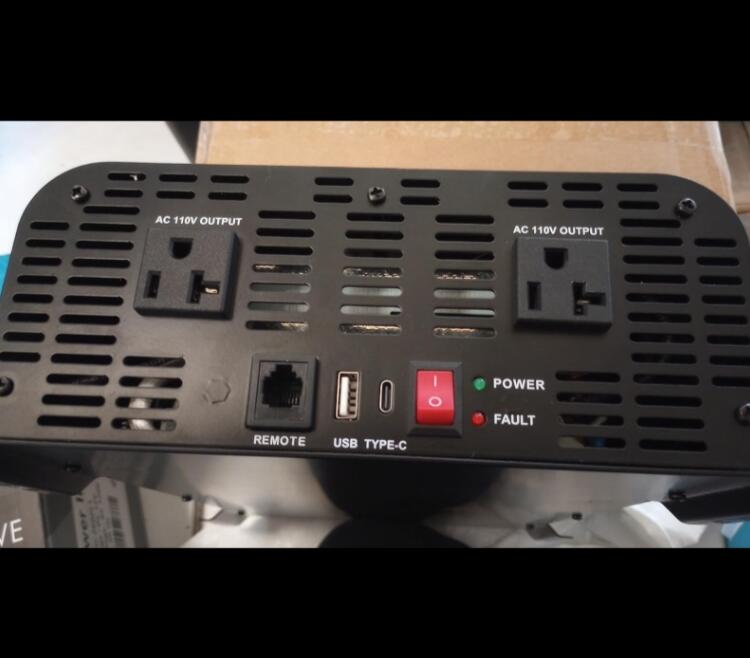
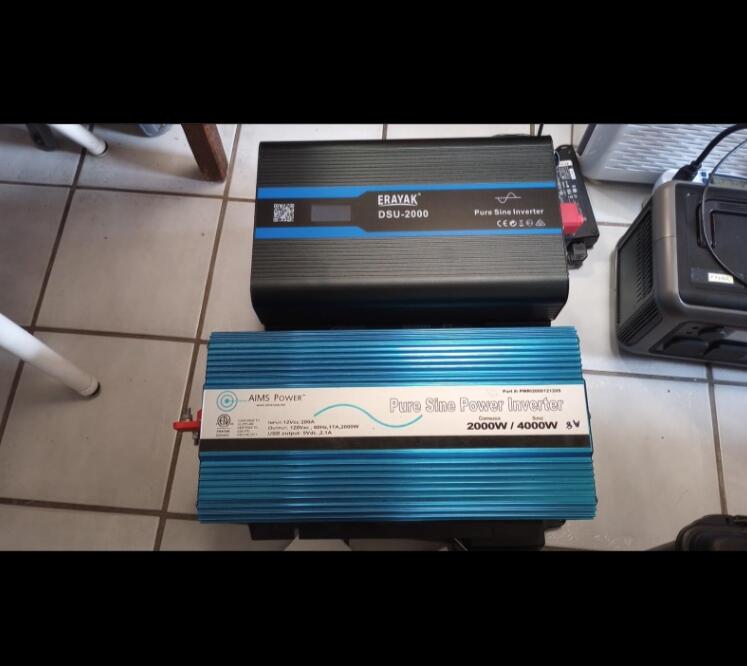
We run this inverter while driving our SUV to charge Lithium ion batteries for our camper. It works flawlessly and I couldn't be happier with it. This inverter is somewhat big and very heavy but with the remote control, it's easy to start it. I can recommend it.
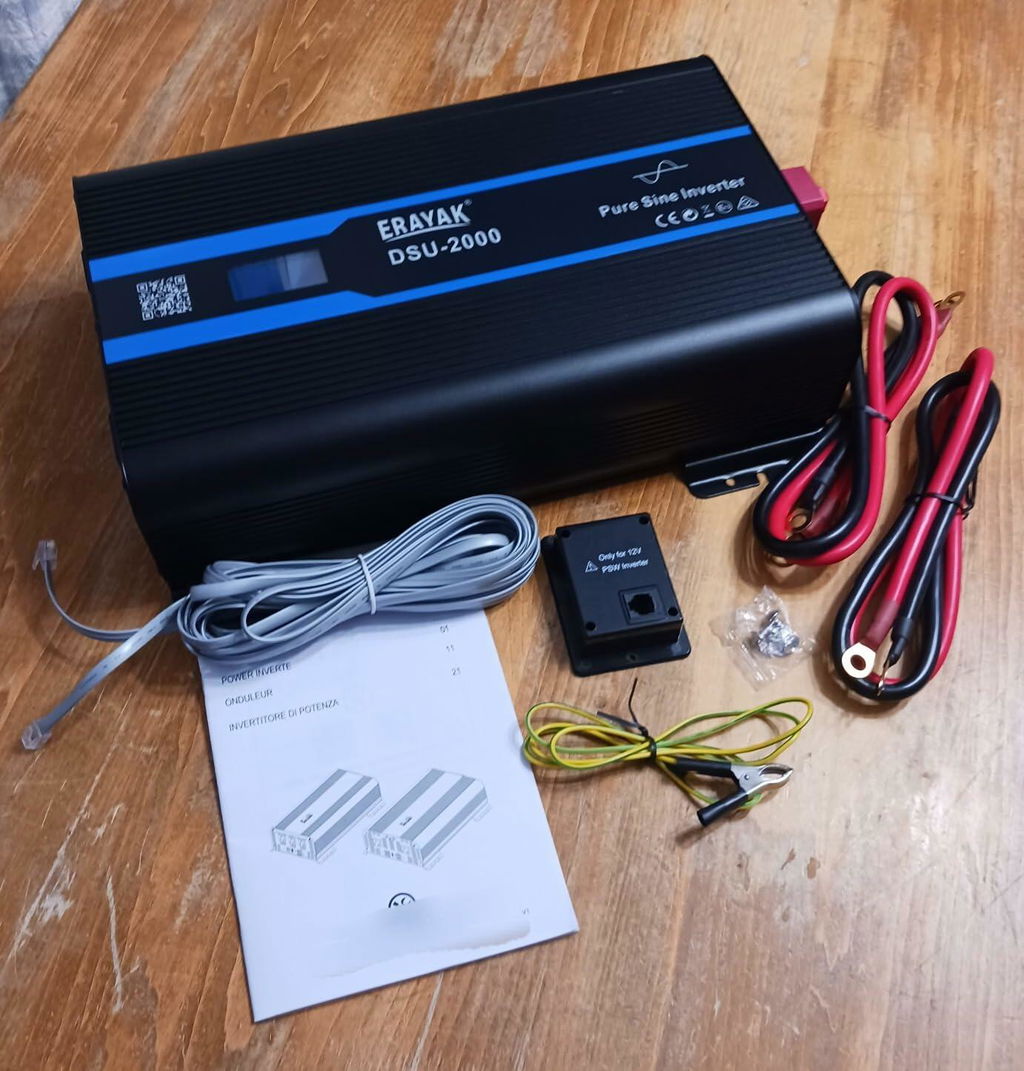
Needed to find a 3000 watt inverter because my 1500 watt pure sine wave inverter could not handle my 600 watt microwave in my Freightliner truck. The 1500 watt inverter worked perfectly fine in a Volvo so I thought it would work in the Freightliner. Well, I could not run the microwave for long in my Freightliner truck before the fuse breaker switch would pop. So I had to do my research. I found this 3000 watt pure sound wave inverter by Erayak. Purchased a new one and it came packaged with all the bells and whistles. Everything was in the box, the set up with a snap, and my microwave works as it should, and no popping the breaker fuse. Happy with this purchase and the extra power. The only criticism is that I do wish it were smaller. But fortunately it still fit in the spot where my smaller inverter was, but barely.
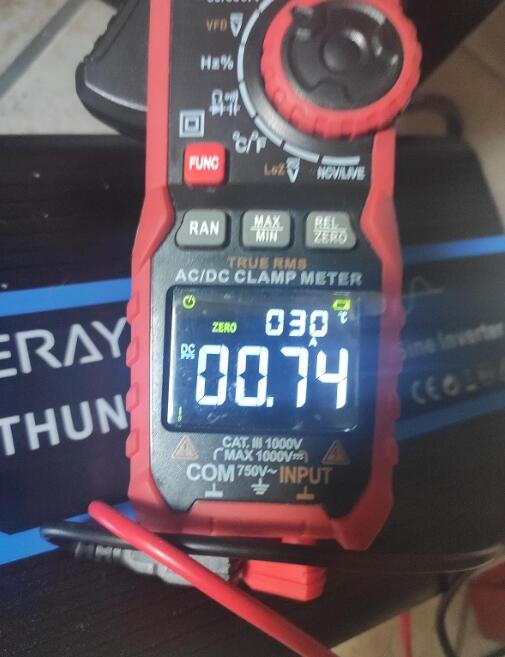
It's been over a couple of months since I set it up. This powerhouse is keeping a fridge, 57" TV, microwave, Keurig coffee machine, and a security light running around the clock without a hitch. The fan rarely kicks in, and even when it does, it's super quiet. Couldn't be happier with its performance. If anything changes, I'll update this review later on.
I have a few 2000 Watt Pure Sine wave inverters and this is the largest. I am not sure if that is because it has heavier duty components or is using older tech which is typically larger. But either way, this performs great. I live out in the country and my power goes off frequently. The pure sine wave is necessary for my computer UPS and systems. The external remote switch is very nice and the whole unit would be great addition in an RV. A 2000 watt inverter is not enough to run your house, but could run probably run an RV depending on what you have plugged in. You would need several for a house. Just double check the Wattage of the devices you are using. IMO, you never want to run an inverter at 100% load for very long and like to keep it around 80% load for any length of time. I will update if anything changes good or bad.
I ordered this for an off-grid pavilion with solar panels and a battery bank. It has a nice remote 'on/off' switch and the wiring to control it. The packaging is good. I haven't hooks up an oscilloscope but everything seems to work like it was on line power.
This would be great for a small home with minimal power requirements. This will require a pretty good sized battery if you want to use it with stuff like a microwave (small) or a hair dryer (1500W) I am pretty impressed with this.
This inverter is large and in charge ! Has all the power I need plus some. Just make sure your vehicle has the battery and alternator power to run it to it's full potential. It will let you know and shut off on low battery voltage. When under a heavy load it does pull a lot of current but is pretty efficient. Has no issue power up a portable air conditioner and misc small items, laptop, cell phone chargers, small flat TV etc. So foa so good Id definitely give a recommendation.
This inverter is exactly what I was looking for. I live in an area with an unreliable electric grid so we decided to install solar panels. Without a service provider, I can't store or access the power my panels generate. That's where this inverter comes in. I have been working on finding ways to be able to independently utilize the electricity from my panels if the grid/service provider are not available. I have been building a small stand alone with batteries so I can at least run my workshop. This is working out exactly like I hoped it would. This inverter is heavy duty, well made using quality materials and works as described. I am very pleased with this inverter and I highly recommend it.
The Erayak 2000W Pure Sine Wave Inverter is a versatile and powerful inverter that can be used in various applications, including powering your home, RV, truck, or off-grid solar power system. It has a number of features that make it a great choice for those looking for a reliable and easy-to-use inverter.
Some of the key features of the Erayak 2000W Pure Sine Wave Inverter include:
Pure sine wave output: This ensures that your devices will receive clean and stable power, just like they would from a wall outlet.
2000W continuous power, 4000W peak power: This provides enough power to run various appliances and devices, including TVs, refrigerators, microwaves, and more.
12V DC input: This allows you to connect the inverter to your car battery, RV battery, or solar power system.
120V AC output: This provides standard AC power that can be used to power various devices.
18W USB-C port and USB fast charger: This allows you to charge your USB devices, such as smartphones, tablets, and laptops.
LCD monitor: This displays important information about the inverter, such as input voltage, output voltage, power output, and battery level.
AC hardwire port: This allows you to hardwire the inverter to your home or RV electrical system.
Remote controller: This allows you to control the inverter from a distance.
In my experience, the Erayak 2000W Pure Sine Wave Inverter is a well-made and reliable product. It is easy to use and has all the features that I need in an inverter. I recommend it to anyone who is looking for a powerful and versatile inverter.
Here are some of the pros and cons of the Erayak 2000W Pure Sine Wave Inverter:
Pros:
Pure sine wave output
2000W continuous power, 4000W peak power
12V DC input and 120V AC output
18W USB-C port and USB fast charger
LCD monitor
AC hardwire port
Remote controller
Cons:
Can be a bit expensive
Some users have reported that the fan can be a bit noisy
Overall, I am very impressed with the Erayak 2000W Pure Sine Wave Inverter. It is a powerful, versatile, and easy-to-use inverter that I highly recommend to anyone who is looking for a quality product.
Here are some additional things to consider before purchasing the Erayak 2000W Pure Sine Wave Inverter:
Make sure that the inverter has enough power to run all of the devices that you plan to use it with.
Consider the type of input and output connections that you need.
Decide whether you need an LCD monitor or a remote controller.
Compare prices from different retailers before making a purchase.
This Erayak 2000W Pure Sine Wave Inverter is neither small nor light. It's a solidly build piece of serious equipment with convincing technical specs. As another reviewer posted, this is a pure sine wave inverter. It creates high quality power with a stable frequency. No frequency and voltage fluctuations, no Noisy RF interference. I can run this inverter right next to my radio equipment with zero issues.
The power output is perfect for my needs: It woks great as a mobile platform and does additional duty with back up power at home.
Don't waster your money on cheap inverters. This is the real deal.
I live part-time in a converted van and I absolutely depend on AC power. I have camped like this since 2018 ,and have gone through many options and several inverters. Currently, I use a solar generator with 400 watts of solar panels on my roof to keep my microwave, capsule coffee pot, and induction burner happy. However, there are times when there isn't enough sun. I can use an inverter to power all of these while idling my car (one at a time). Additionally, I can run the inverter while driving to power the the solar generator's AC adapter (to charge it) when driving. This way I always have power to spare. This is what to look for if you are in this situation.
Power: I think 2,000 watts is ideal. The largest wattage that any normal home appliance will pull is 1,800 watts, with many appliances using 1000-1500 watts. My coffee pot uses around 700 watts, my microwave uses 1,100 watts (700 watts output), and my induction burner uses a maximum of 1500 watts. A 2 KW inverter can handle any of these (again, one at a time). I could get a bigger inverter but I don't think my vehicles electrical system could handle it.
Pure Sine Wave: This option is becoming more common and less expensive. If possible, don't buy a modified sine wave inverter. Some things (like many CPAP machines) won't run with dirty power. Others (like some microwaves) may, but they will make more noise, heat your food slower, and likely wear out faster. Pure sine wave most closely duplicates the power that comes out of your power outlet at home.
Additional items to look for
Remote Control: high powered inverters are large and so they are often mounted under or in something. It is best to turn on an inverter only when you need it, as leaving it on will consume quite a bit of energy even if you don't have something plugged in. Some units don't have a wired remote, for some it is an extra purchase, but this unit gives you the remote as well as the connecting cable. I have my remote mounted next to my driver's seat so I can easily turn on the unit to charge my solar generator when driving. It is convenient enough to also turn it on and off when using the inverter as a back up when cooking.
Display: This unit has a simple display on the top, which is nice. Its biggest benefit is that it will give you error codes. I had a problem where my inverter kept on shutting down. By using the error codes I discovered that I had low voltage and was able to trace the problem to a loose battery connection.
Fans: Hot components fail. Good fans cool down hot components. This unit has two fans for good ventilation
Extra: This unit is big and heavy. I'm making an assumption, but it is that this unit has larger components than some other units that I have examined. Beefy components tend to last longer.
A beast of an inverter.
The Erayak 2000W/3000W Pure Sine Wave Inverter is a high-performance device that seamlessly converts 12V DC to 120V AC power, providing a reliable and efficient power solution. Ideal for a range of applications, this inverter offers 2000W to 3000W of continuous power with a peak surge capacity of 4000W to 6000W, ensuring it can handle high-power demands with ease. The pure sine wave output guarantees over 90% conversion efficiency, reducing loss and ensuring cleaner, more stable power.
Safety is paramount with this inverter. It features LED indicators for under-voltage, over-voltage, over-temperature, over-load protection, and short circuit indication. The inclusion of cooling fans and ground-fault circuit interrupter (GFCI) protection further enhances its safety credentials, making it a secure choice for various environments.
A standout feature is the LCD display, which offers vital information about input and output voltage, power, and error messages, ensuring that users can monitor and manage the power system effectively. The added convenience of a remote control panel, operable from up to 6 meters away, allows for easy operation, turning the inverter on and off as needed.
Moreover, this inverter is designed to protect and extend the life of your electronics and appliances. The advanced pure sine wave technology provides quality AC power equivalent to grid power, ensuring that your devices such as flood lights, TVs, freezers, laptops, and tablets are not only safe but also operate smoother, cooler, and quieter.
User-friendliness is also a key aspect of the Erayak inverter. It includes built-in dual 5V/2.1A USB ports, dual AC outlets, and an AC terminal block, offering convenient connectivity options. The package comes complete with the inverter, car battery cables, a remote control, and a 6-meter remote control cable, making setup straightforward and hassle-free.
In summary, the Erayak 2000W/3000W Pure Sine Wave Inverter is an excellent investment for those in need of a powerful, safe, and user-friendly power conversion solution. Its combination of efficiency, safety features, and ease of use makes it a highly recommendable choice for a wide array of applications
I use this as part of my little solar power system to power my living room. It's not enough to power my entire house, but it powers the lights, TV, DVD player and stereo in my living room just fine with power to spare. It's quiet, reliable, and easy to use. It can also power the electronics in my gas furnace during a winter power outage. Overall, I am very pleased with this inverter, and I definitely recommend it!
It’s strange what impresses me lately. I never realized “can allow the air conditioner for a 72 square foot space to power on” would be high praise for an electrical component and yet, here we are. Dometic, despite their claims of modernity, mostly produces appallingly inefficient appliances with 1950s technology solely because RV buyers don’t know any better. There’s tons on RV blogs about people being proud of finding “hacks” to allow them to accomplish this incredible feat of turning on a single room air conditioner with a mere 70 pound 2200 watt gasoline generator, because, impressively, they can fit such generators inside their vehicles. My friends, this Erayak 3000w inverter can power that absurd fossil of a cooling device with less than 75 pounds of batteries, and if you were reckless about cooling you could fit the whole shebang inside a regular army foot locker.
Of course, you shouldn’t. It is really the wires more than any other part, but you need air circulation for cooling of the components. At full power, this thing draws nearly 250 amps of DC power and yes, that can melt the insulation on lesser wires. That side of the process is no joke. But the device itself is absolutely tough and will handle the absurd loads you may throw at it.
The wiring is no joke. Renogy will tell you about fuses but most RV blogs are lax. You should put a separate 100a fuse on each battery, and you should have at least three batteries feeding this beast in parallel. 100a at 13v DC can absolutely start a heck of a fire so check and double check your wiring. But once you do, you can count on this component not to be the bottleneck in anything short of cooking thanksgiving dinner on a resistance range. Just use an induction top and an air fryer and you should be golden with this kit.
I bought and installed this in my RV/Truck camper.. This was actually a “reinstall” / inverter replacement. I had a GOPOWER 3000 watt inverter installed previously. It wouldn’t power my microwave, AC, or provide stable consistent power.. The microwave would work at about 50% power and the AC would overload the inverter during startup. A 1500 watt AC unit overloaded a 3000watt inverter!? (Modified Sine wave) I thought something was wrong! I generate commercially.. It’s what I do. (Power plant operations) Still, I was unaware of the difference between PURE Sine wave and MODIFIED sine wave inverters. When I began researching why my 3000 watt gopower inverter wouldn’t run a 900watt microwave or a 1500 watt AC unit, (separately) the difference is actually quite significant. My new Erayak 2000watt inverter is now powering my AC unit.. It runs everything in my RV and provides stable consistent 120 volt power. My microwave heats like a normal microwave, and instead of my AC voltage being all over the place, it’s always a constant 118-120 volts. This is a no brainer! DO NOT WASTE YOUR $ on a modified sine wave inverter!!! If you really want to, I’m selling a 3k GOPOWER inverter. Only used a few times! Like new! I’ll give ya a heck of a deal… Or, you could just buy a Erayak and be done with it. I know what I’m doing, so I didn’t need Erayak tech support.. Seems a lot of reviews don’t have many good things to say about the Erayak tech support. Something to keep in mind if you have limited experience with electrical.
Can I get solar panels to hook up to this the 3000 watt
Thank you for your question!
Our current 3000W inverter cannot be connected directly to solar panels. It is designed to connect to a 12V battery, which then supplies power to the inverter.
If you plan to use solar panels, you would need a solar charge controller to charge the battery first, and then connect the inverter to the battery.
We will be launching a new 4-in-1 inverter around July, which will support direct connection to PV solar panels.
Please feel free to reach out if you need recommendations for a suitable setup.